Claude Code Mods: The 5 Worth Installing
Mods run inside Claude Code, not around it. Here are the five that earn their place, with the install commands, plus a prompt that tells you which one to build next.
From the videoClaude Code Just Dropped Mods. Here Are 5 You Need.
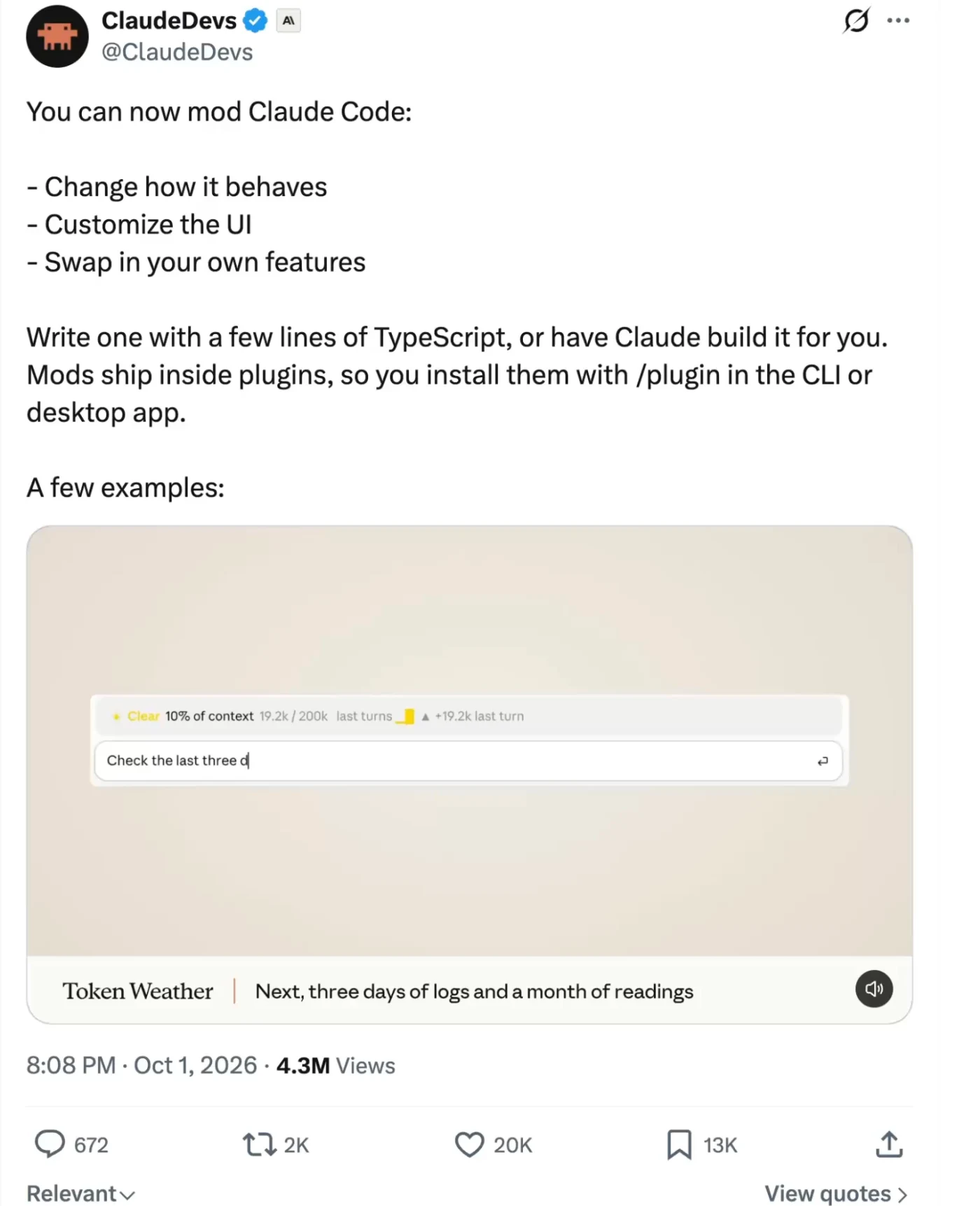
A Claude Code mod is a small TypeScript function that runs inside Claude Code. It can watch what Claude is about to do, change it, stop it cold, and draw its own interface on your screen. Mods shipped on 1 October 2026 in Claude Code v2.1.287 and later, and they are on by default once you update. You install them like any plugin, with /plugin.
That is the whole mechanism. What follows is the five worth installing today, the exact commands, and a prompt that reads how you actually work and tells you which mod to build next.
What a Claude Code mod actually is
A skill or a connector sits around Claude Code. A mod sits inside it, in the same process, with hooks into the events the agent fires as it works: turn.complete, tool.call, ui.render, command.run and others.
Three things follow from that, and they are the reason mods can do things no skill can:
- It can see an action before it happens. A mod gets the tool call while it is still a proposal, so it can hold it, rewrite it or refuse it.
- It can draw. A band above the prompt, a pane beside the transcript, a row in the footer. The interface is yours.
- It can add slash commands. Your own
/something, registered at load.
Mods work in two places: the Claude Code terminal and the Code tab of the desktop app. A few are terminal only, and I have flagged those below.
Anthropic is already shipping its own features as mods rather than as built-ins, which is the clearest signal of where this goes. The same hook surface that lets a stranger draw a progress bar is the one /diff uses.
One thing worth knowing before you install anything: a mod runs in the same process as the agent, not in a sandbox beside it. It can read what Claude reads and see what you type. That is exactly why Blast Radius can work at all, and it is also why you should install from a source you can read. Every mod below links to its source for that reason.
How to install a Claude Code mod
Two ways. Inside a session, type /plugin and browse. Or from your shell:
claude plugin marketplace add <owner>/<repo>
claude plugin install <mod-name>@<marketplace>
Then reload, either by running /reload-plugins in the session or by starting a new one.
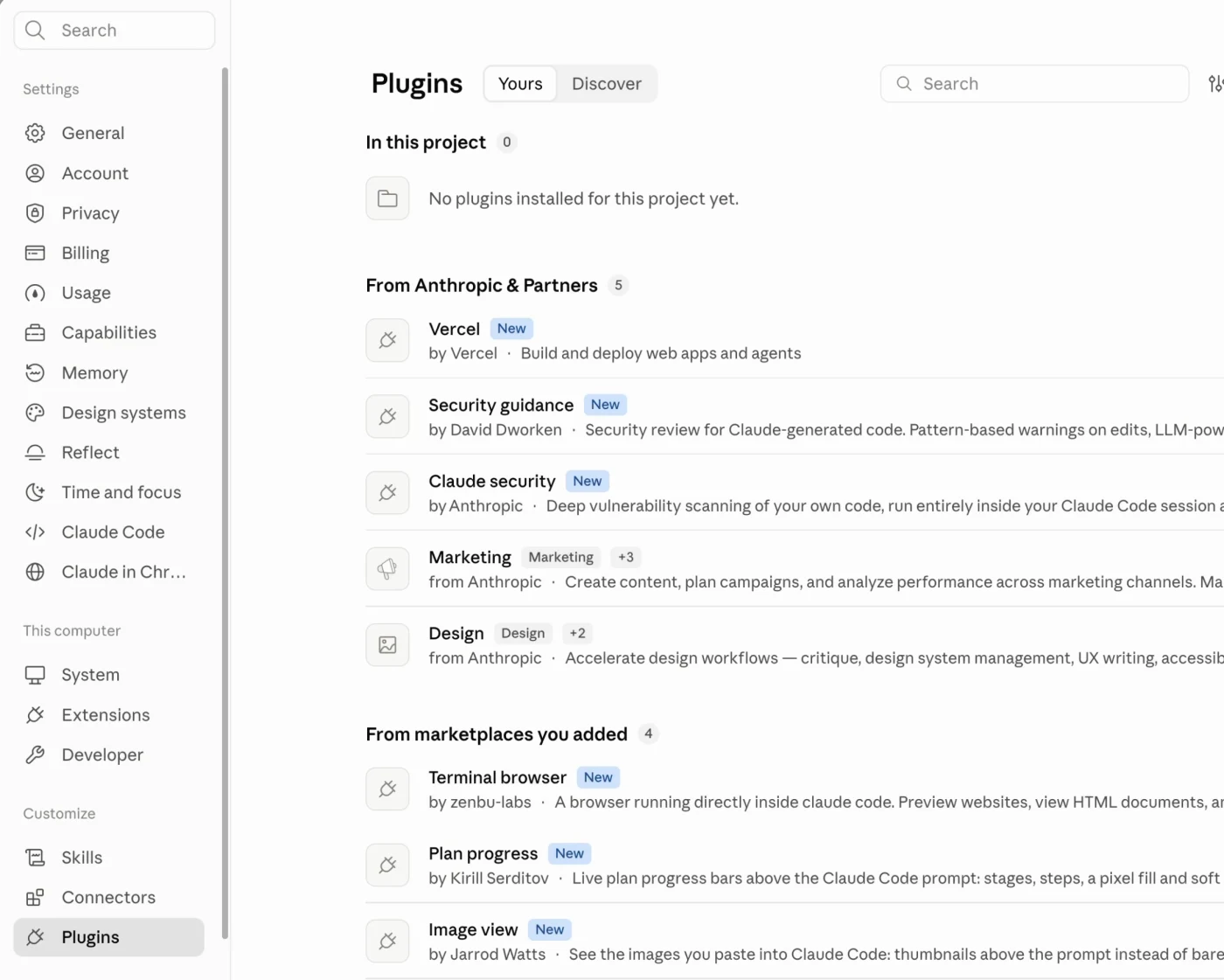
Anthropic publishes three sample mods with full source at claude.dev/mods: token weather, blast radius and replay theater. The plugin docs cover the hook list and the API.
The 5 Claude Code mods worth installing
1. Next Steps
Every time Claude finishes a turn, a small panel appears above the prompt with three suggestions for what to do next. Not generic suggestions: it reads what you were doing and proposes the next move. You click one and it is pasted as your prompt, ready to send.
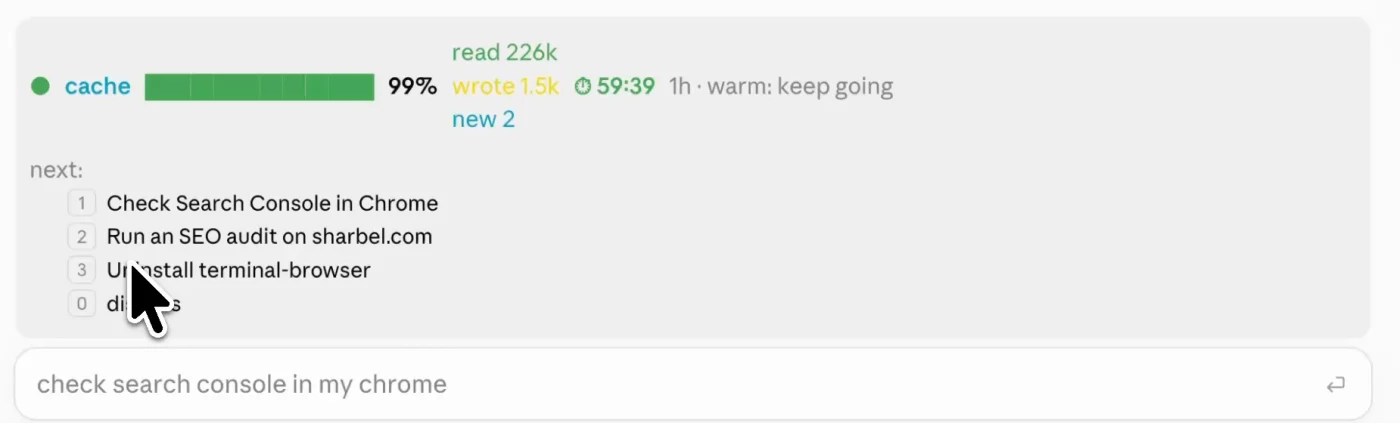
It is built by Thariq, an engineer at Anthropic, and it lives in the community marketplace.
claude plugin marketplace add anthropics/claude-plugins-community
claude plugin install next-steps@claude-community
The value is not the suggestions themselves. It is that you stop losing ten seconds per turn deciding what to type.
2. Cache Control
This is the one that saves money, and it fixes a problem most people do not know they have.
Your whole conversation is cached. Every message you send, you are not paying full price to resend the entire chat, as long as that cache is warm. It stays warm for about an hour. Step away, come back later, and your next message pays full price for the entire conversation again. On a long session that is a few dollars, every time.
Cache Control puts the timer on screen: how much of the cache is being served, what you have read and written, and how long before it goes cold.

It is by Daniel Ávila and ships through claude-code-templates:
npx claude-code-templates@latest --mod observability/prompt-cache-controlOnce it is in, you can see the decision instead of guessing it: fire a message now and keep the cache alive, or let it lapse because you are done anyway.
The number that matters on that band is the read figure. When it says it served 226k from cache, that is 226k of tokens you did not pay full rate to resend. When the timer lapses, the next message rebuilds all of it.
3. Plan Progress
When Claude is working, the screen fills with tool calls and you cannot tell whether it is 10% through or frozen. Plan Progress replaces that with a bar: the plan, the step it is on, the percentage left.

claude plugin marketplace add zycck/claude-mods
claude plugin install plan-progress@zycck-mods
The repo is zycck/claude-mods.
It also plays a sound when a task finishes, and that is the part I did not expect to care about. If you start something long and switch to Slack or a browser, you have no idea when it is done, so you keep checking. The sound ends that.
4. Blast Radius
Claude Code runs real commands on your machine. That is the point of it, and it is fine right up until it runs something destructive against the wrong folder.
Blast Radius intercepts destructive commands before they execute. It holds the call, shows you exactly what would be removed, and waits.
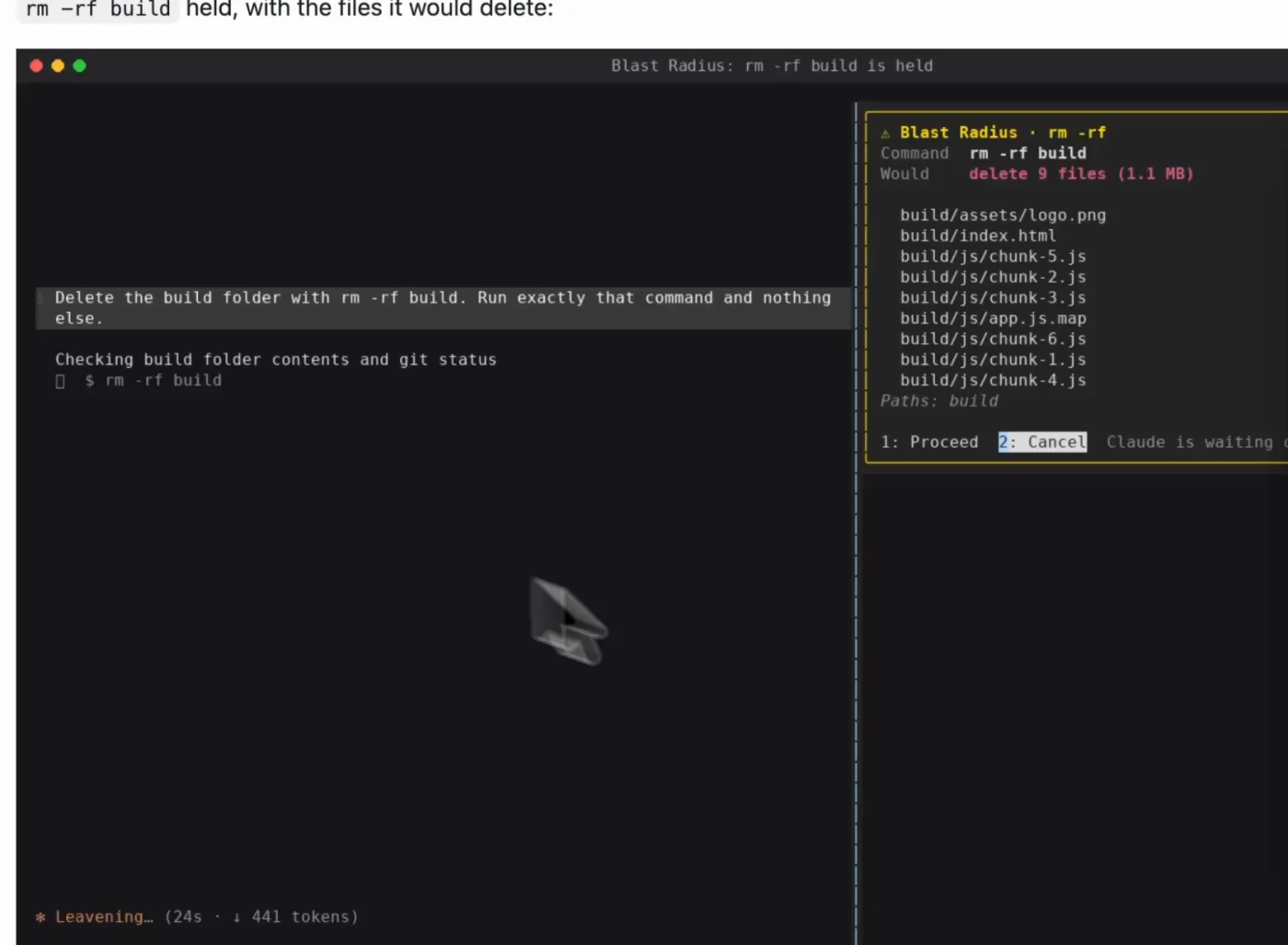
It is an Anthropic sample mod, with source in anthropics/claude-code-playground. It hooks tool.call, holds the call until you answer, and returns a deny with a reason Claude can act on if you cancel.
This is the one nobody thinks they need. It is a seatbelt. You put it on before the crash.
5. Image Viewer
Normally, when Claude generates or you paste an image, the terminal shows you [Image #1] and nothing else. You go find the file and open it yourself.
This renders the thumbnail above the prompt, the moment you paste.
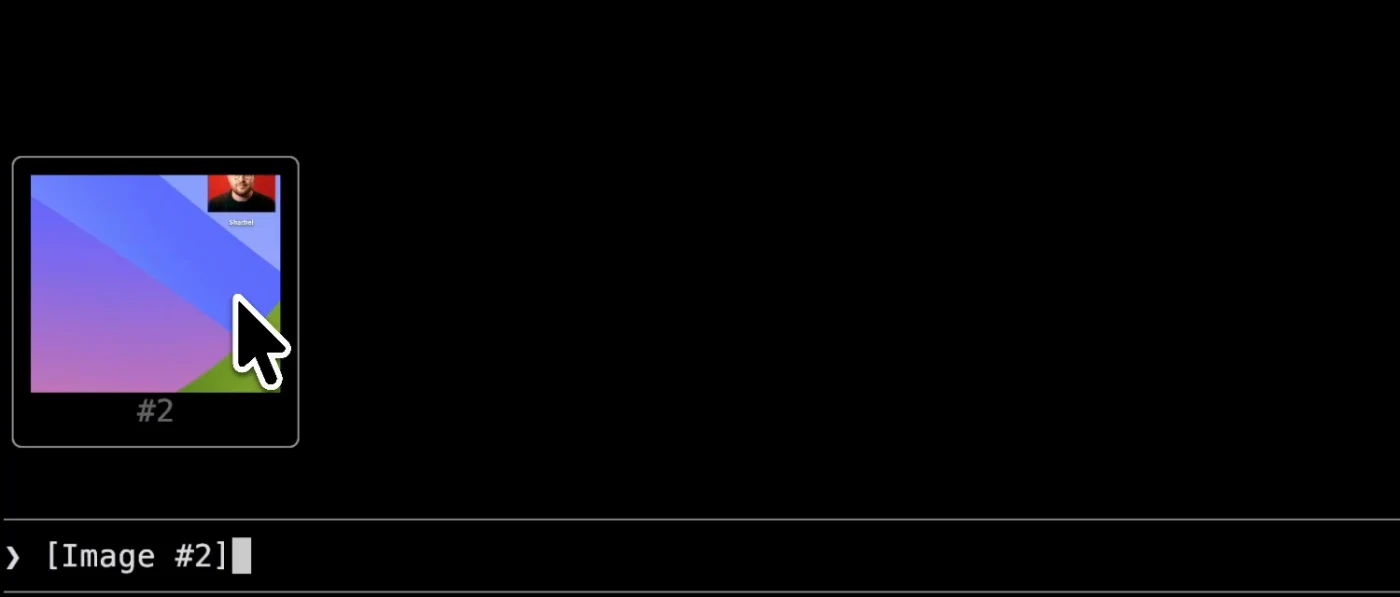
claude plugin marketplace add jarrodwatts/claude-image-view
claude plugin install image-view@claude-image-view
Built by Jarrod Watts, repo at jarrodwatts/claude-image-view. Note the mod is named image-view, and it is mostly for the terminal rather than the desktop app. If you work with screenshots at all, not leaving the window adds up faster than you would think.
How to build your own Claude Code mod
This is the part that makes mods different from skills and connectors. You do not have to find the right one. You describe what you want and Claude builds it into itself. Claude Code ships with a built-in skill that teaches it how to write mods, so you just talk to it.
The best starting point is not guessing. Let Claude read how you actually work and tell you what to build. Paste this:
audit how i actually use claude code. read my last 20 sessions. and find three
things: the questions i keep asking you, the commands, and how i check your
work. then suggest 5 mods that would fix those or enhance my workflow. show me
the ideas first. do not build anything until i pick one.
A minute later it comes back with the patterns, not a generic list: the questions you repeat, the commands you actually use, how you check its work, and five mods built around those.
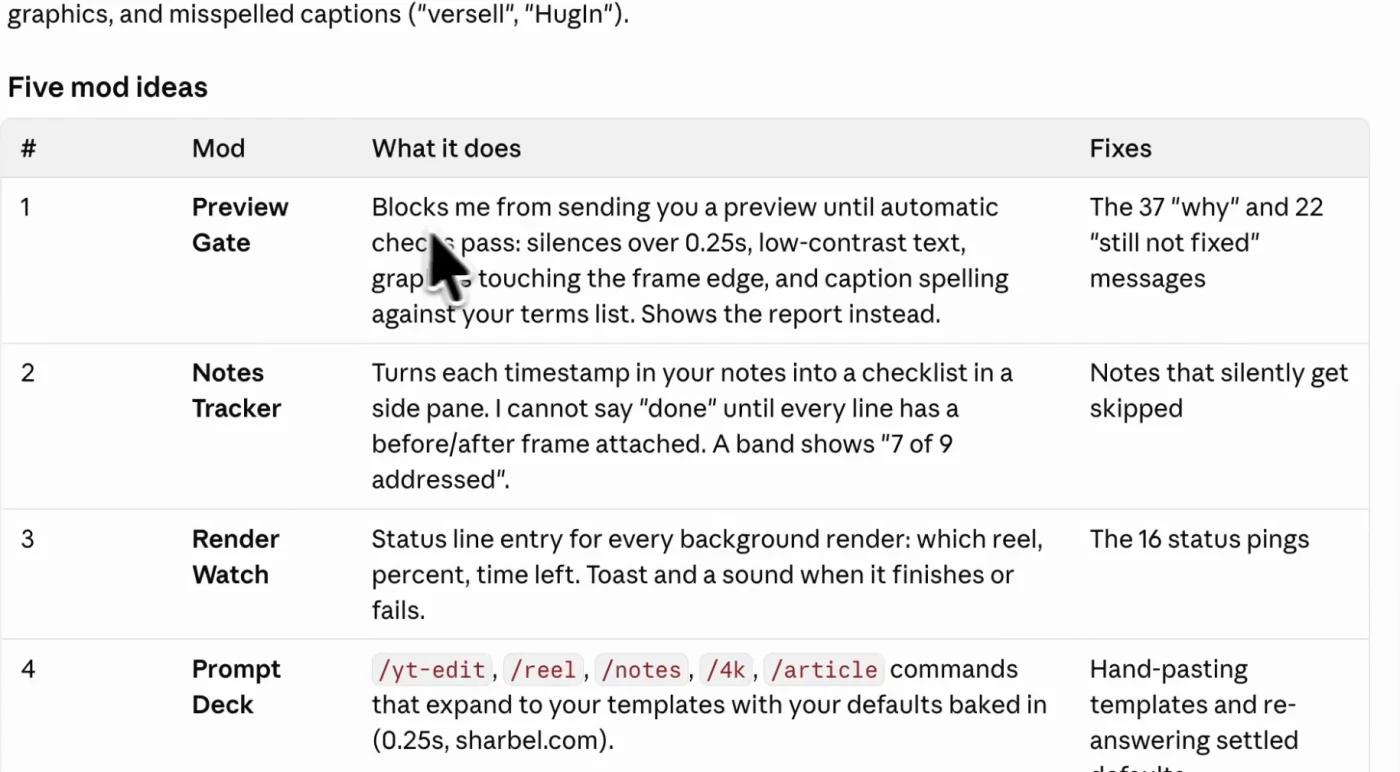
Pick one and tell it to build. Then make it stick:
save this as a plugin and install itWithout that, a mod Claude builds is temporary and disappears with the session. With it, it loads every time you open Claude Code.
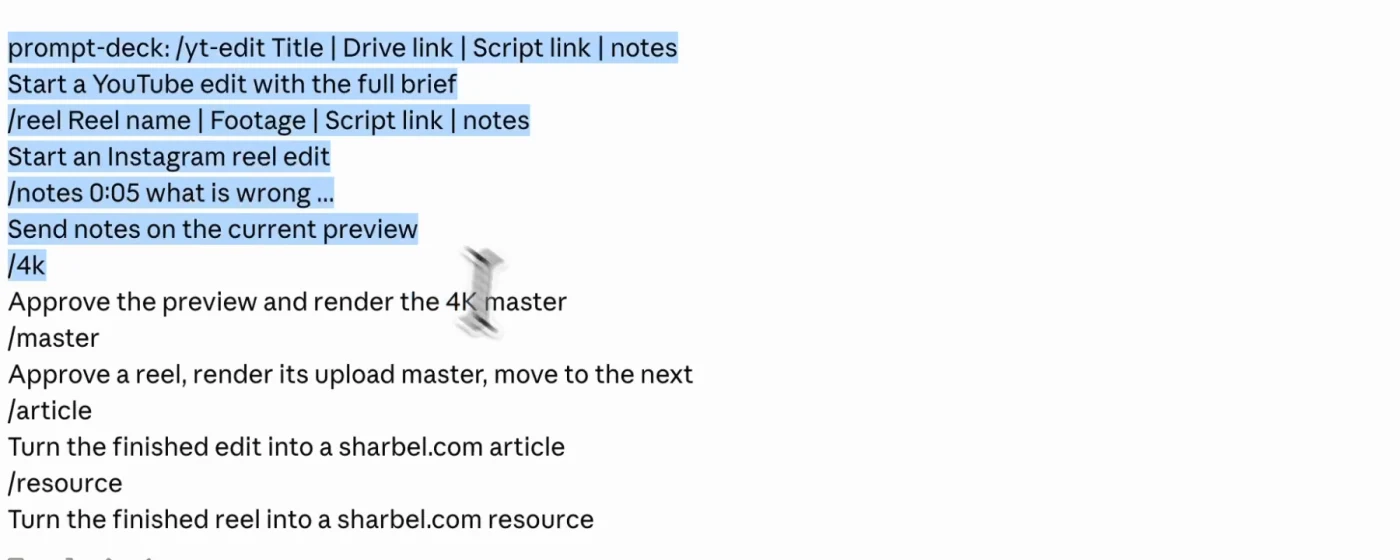
That screenshot is a mod built live from the audit: a prompt deck that turns the templates I was hand-pasting into real slash commands with my defaults already baked in.
The reason the audit beats a list is that it reads evidence rather than opinion. It counted the questions I ask most, found that I barely use slash commands at all and paste long templates by hand instead, and proposed the mod that closes exactly that gap. None of the five it suggested would have occurred to me.
Honorable mention: Doom while you wait
Completely useless, and my favourite thing anyone has built with this. When Claude has been working for a couple of seconds, a pane opens beside the transcript and drops you into a multiplayer Doom deathmatch. Every other player in the match is a person waiting for their own Claude to finish. When yours is done, you get handed back.
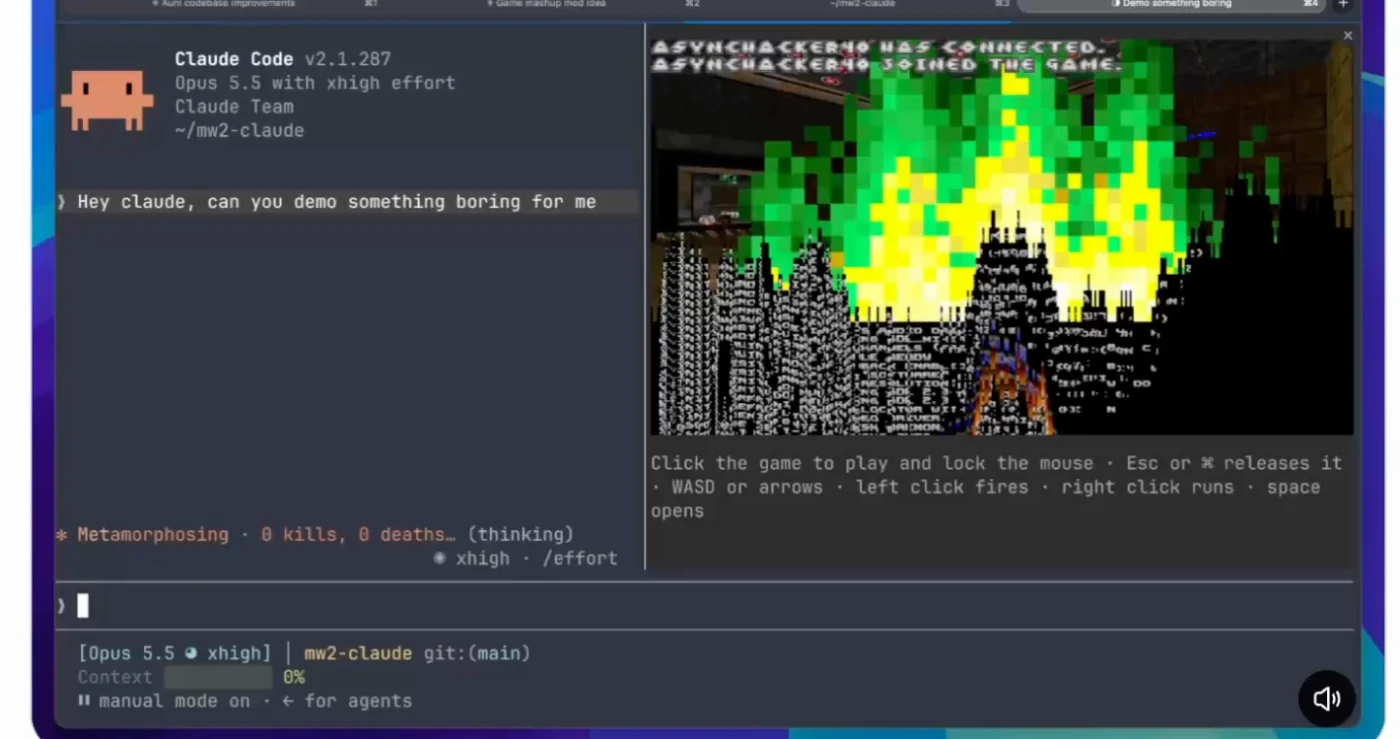
/plugin install intermission --marketplace jarrodwatts/intermissionThen run /intermission. Repo: jarrodwatts/intermission. It needs macOS on Apple silicon or Intel, a terminal that can draw pixels such as Ghostty or kitty, and Claude Code 2.1.287 or later.
That is the whole point. It is your Claude Code now.
Every link in one place
- claude.dev/mods: Anthropic's mods page, with three samples and their source
- Mods documentation: hooks, API and how to write one
- Next Steps: by @trq212
- Cache Control: by @dani_avila7
- Plan Progress: the zycck-mods marketplace
- Blast Radius: Anthropic
- Image Viewer: by @jarrodwatts
- Intermission (Doom): by @jarrodwatts
What to do next
Install Cache Control first. It is the one with a number attached: it shows you money you are currently losing without knowing it, and it takes one command.
Then run the audit prompt. The five mods above are the ones that are good for most people. The one that is good for you is the one that fixes the question you keep asking Claude every single day, and you will not find that on a list.
Questions
- What is a Claude Code mod?
- A mod is a small TypeScript function that runs inside Claude Code, in the same process as the agent. It hooks events like turn.complete, tool.call and ui.render, so it can watch an action before it happens, change or stop it, draw its own interface, and register slash commands. A skill or connector sits around Claude Code; a mod sits inside it.
- How do I install a Claude Code mod?
- Type /plugin inside a session and browse, or run claude plugin marketplace add <owner>/<repo> followed by claude plugin install <mod>@<marketplace> from your shell. Then run /reload-plugins or start a new session. Mods need Claude Code v2.1.287 or later and are on by default once you update.
- Are Claude Code mods safe?
- A mod runs in the same process as the agent rather than in a sandbox, so it can read what Claude reads and see what you type. That is what makes a mod like Blast Radius possible at all. Install from sources you can read, and prefer the Anthropic samples and well-known community repos.
- Do mods work in the terminal or the desktop app?
- Both. Mods run in the Claude Code terminal and in the Code tab of the desktop app. A few are terminal only, usually because they draw pixels: the image viewer is mostly useful in the terminal, and the Doom mod needs a terminal that can render graphics such as Ghostty or kitty.
- Can Claude build a mod for me?
- Yes. Claude Code ships with a built-in skill that teaches it how to write mods, so you describe what you want in plain English and it builds it. A mod it builds is temporary until you tell it to save the mod as a plugin and install it, which makes it load in every future session.

You made it to the end
That is the whole build. Want the next one?
Read next
How to Give Claude Code Screen Context and Voice
Circle anything on your screen, say what you want, and a Claude Code run starts in your project. The full setup, the costs, and the free alternatives.
How to Use Claude Code: The Complete Guide
Setup, permission modes, CLAUDE.md, context, cost, skills, hooks and the seven day path to actually learning it.
How to Give Claude Code and Your AI Agent Shared Memory
Connect a builder and an operator to one memory store, so what you tell one the other already knows.