What GPT-6 Astra Can Actually Do: 5 Use Cases I Tested
It opens a browser, drives desktop software click by click, and keeps working until the job is done. Here are five real jobs I gave it, with every prompt.
From the videoGPT-6 Astra Is Out. 5 Insane New Use Cases
GPT-6 Astra is OpenAI's flagship model, released on 3 September 2026. The thing that changed is not how smart it is. It is that Astra operates software: it opens a browser, drives desktop applications click by click, and keeps working until a job is finished. OpenAI reports about 72.6% on the OSWorld computer-use benchmark, up from 65.7%, at roughly twice the speed.
I gave it five real jobs. Every prompt I used is below, in full, free, and nothing is gated.
What is GPT-6 Astra?
Astra is the successor to GPT-5.6 Sol and is available in ChatGPT. It has a context window of about 1.05 million tokens. Through the API it is $10 per million input tokens and $50 per million output, with cached input at $1.
The part that matters for everything below: Astra runs on OpenAI's machines, not yours. When you hand it a task that takes nine minutes of clicking, the clicking happens server-side. You can start it and walk away.
What actually changed: computer use that works
Computer use is not new. OpenAI's own Operator and Anthropic's computer use both predate this, and the 65.7 baseline in that benchmark is the previous model doing the same job. Nothing here was invented in September.
What changed is the failure rate. The older models were slow and got it wrong about a third of the time, which makes a feature you cannot trust with anything that matters. Astra is the first one fast enough and right often enough to hand real work to.
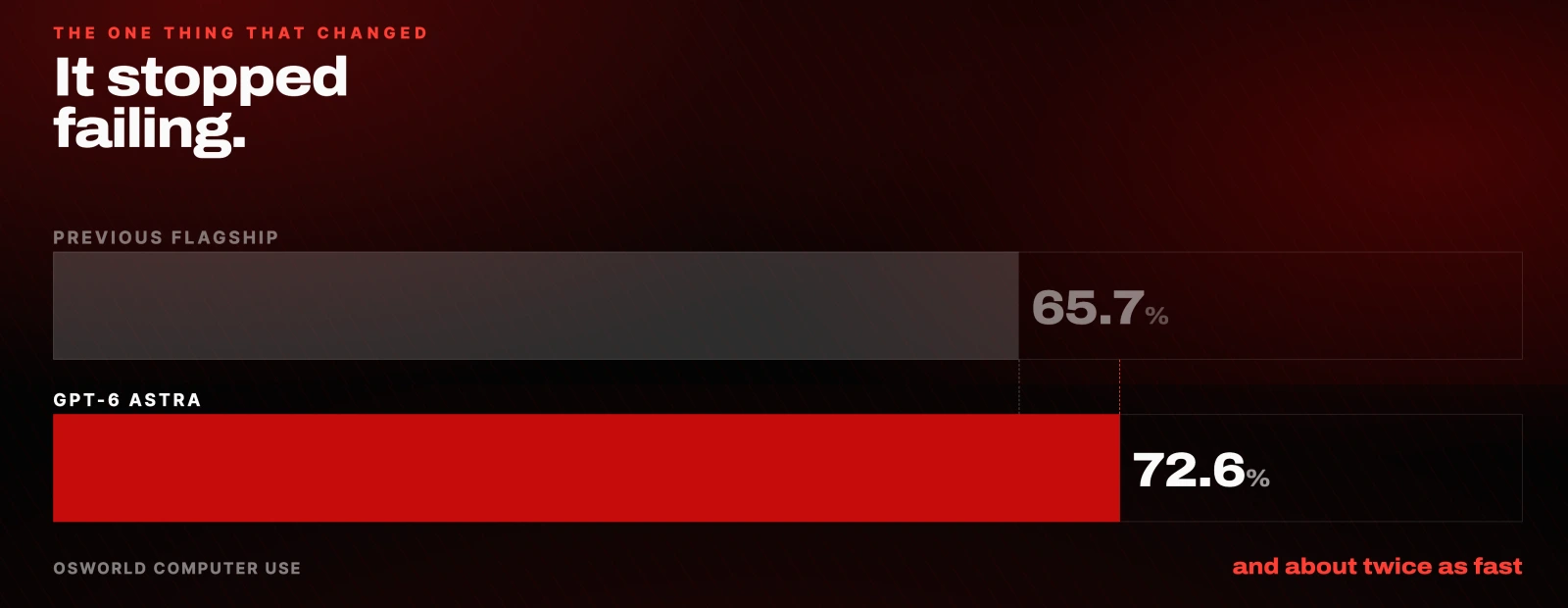
Be straight about where those numbers come from: OSWorld and the speed figure are OpenAI's own reported benchmarks. Treat them as a vendor's claim.
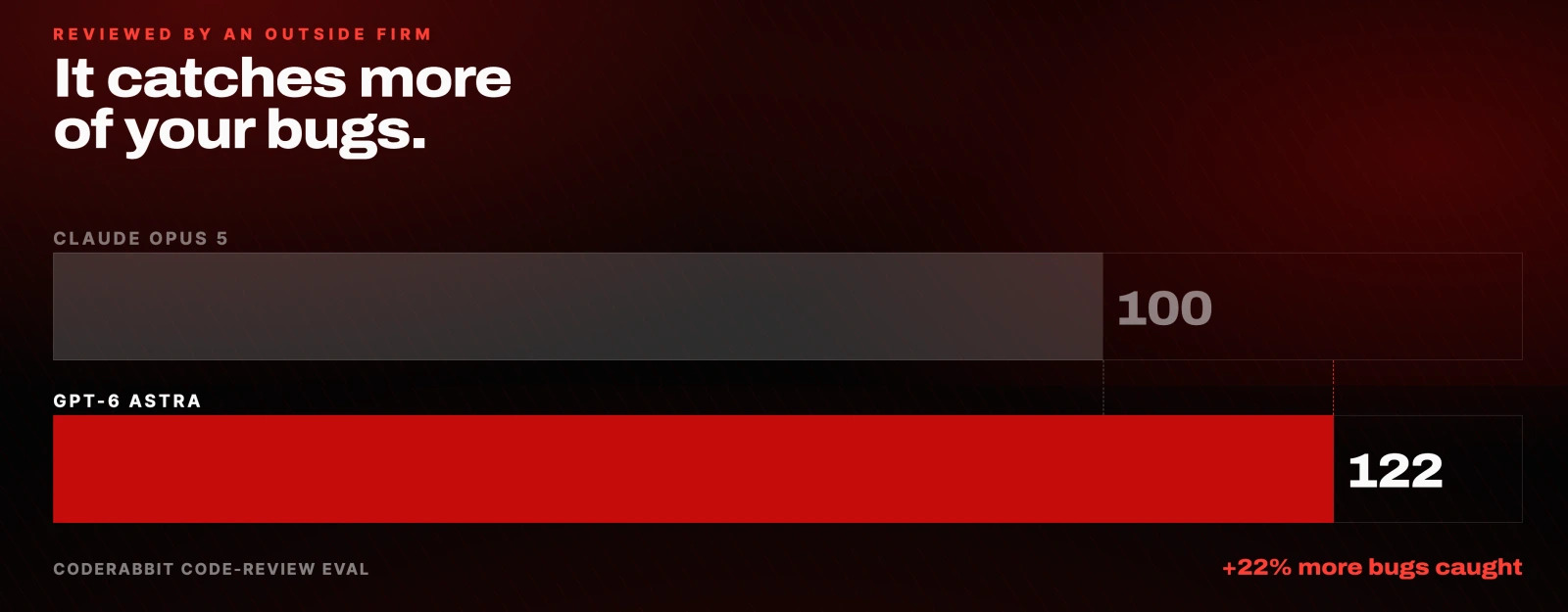
There is exactly one independent number in this piece. CodeRabbit, an outside firm that reviews code for a living, measured Astra catching about 22% more bugs than Claude Opus 5, with the gap widest on bugs hiding across a whole codebase.
If you want the mechanics rather than the marketing, OpenAI's computer use guide is the practical page, and the Astra announcement and safety overview carry the claims.
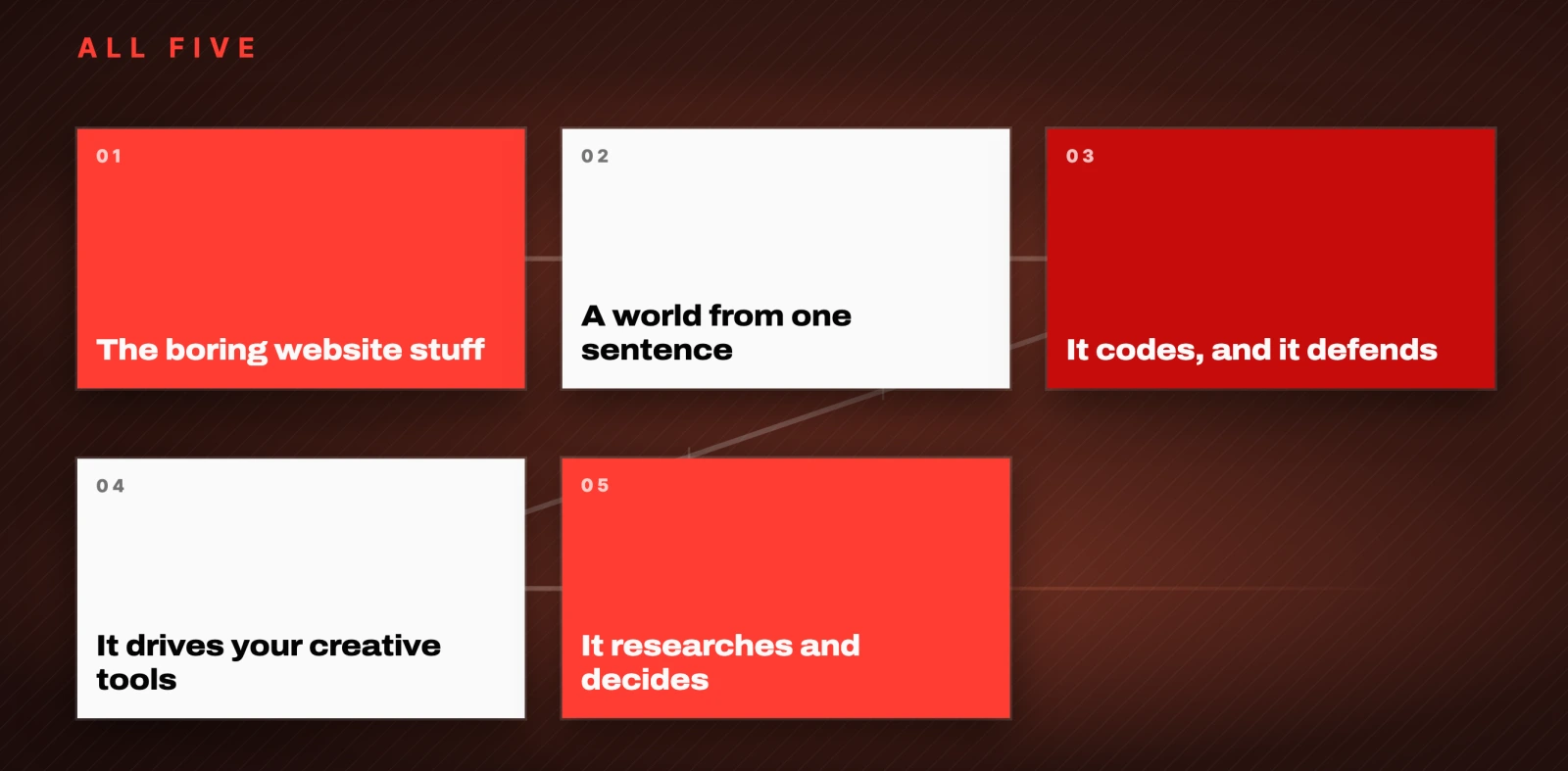
1. It clears the website busywork
The first job was the pile everyone has been avoiding. I pointed it at my inbox and asked it to find the messages that were actually costing me money by sitting there.
Use computer use to open my inbox. Go through the last few weeks and find the real opportunities, the emails that actually need a reply or a follow-up. Think leads, potential clients, partnerships, brand deals, anything with money or a relationship on the line. Ignore the newsletters and the noise. Give me a short prioritized list: who it's from, what they want, and how many days it's been sitting. Then draft a reply for each one in my voice, ready for me to review. Do NOT send anything, just leave them as drafts and show me the list first.It opened the browser itself, read four weeks of threads, and came back with a ranked list: what each one wanted and how long it had been waiting. The oldest was 22 days. Then it wrote a reply to every one of them.
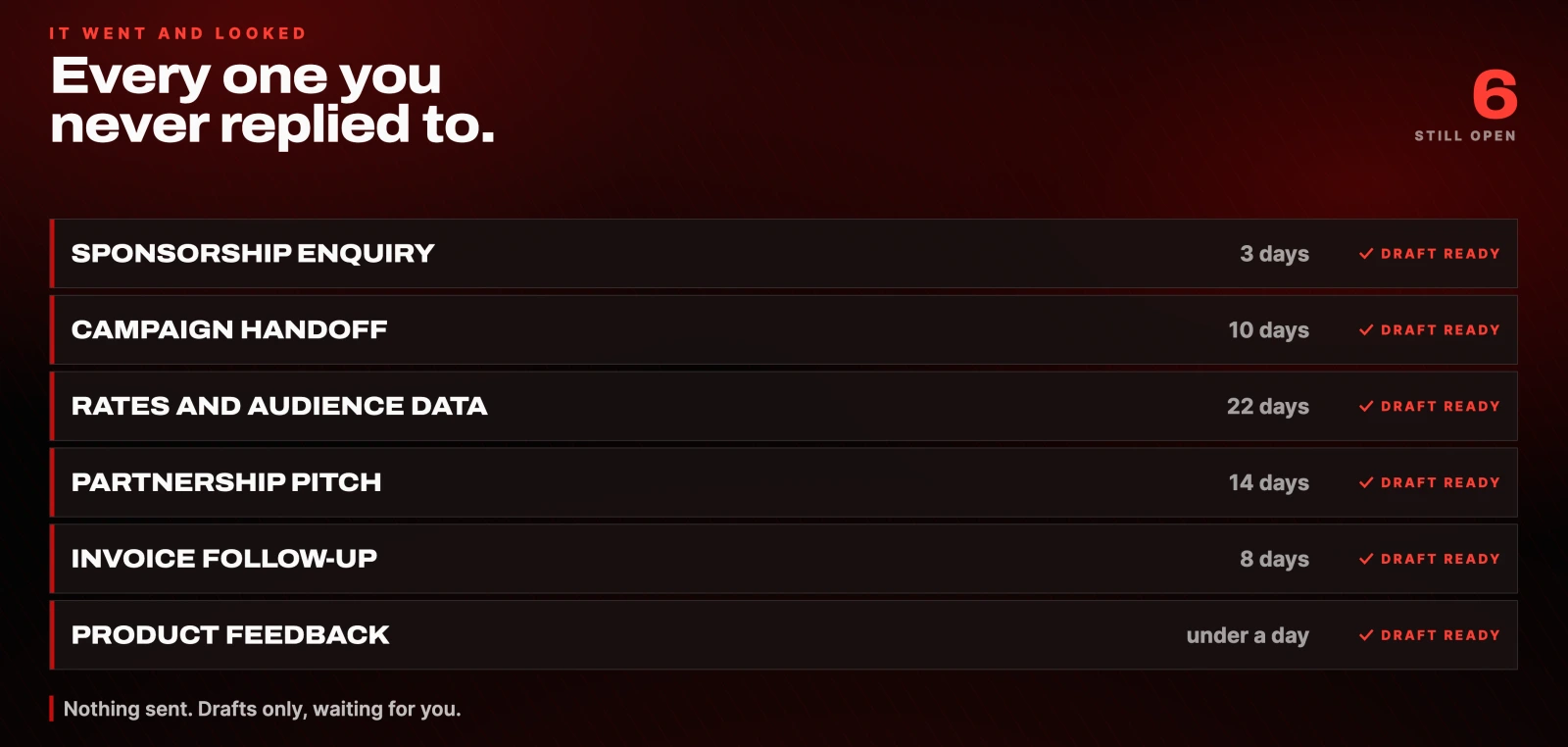
The last line of that prompt is the important one. Do NOT send anything keeps it on the safe side of the line. It drafts, you send.
The same approach works for booking calls, filling forms and submitting applications, because it is operating the actual websites rather than calling an API that may not exist.
The honest catch. It still slips. It is slower than doing the task yourself, faster than the last model but not faster than you. Watch it before you let it near anything that spends money. It is an assistant, not autopilot.
2. It builds a 3D world you can walk around in
This is the one that changes how you think about the model. One sentence in, a playable world out, running in the browser with no software installed.
Build me a 3D world I can walk around in, right in the browser. WASD to move, space to jump. Theme: a cozy floating-island village at golden hour with little characters wandering around. I want a quick 1 level game first so give me something I need to complete inside the game. Then use the critic-agent loop above until it scores 8+. When it's good, publish it and give me a link.It built Skybell Village. WASD to move, space to jump, and a real objective: collect five sunseeds, then ring the bell. It handled falling off the island by putting you back. It added music and sound effects nobody asked for.
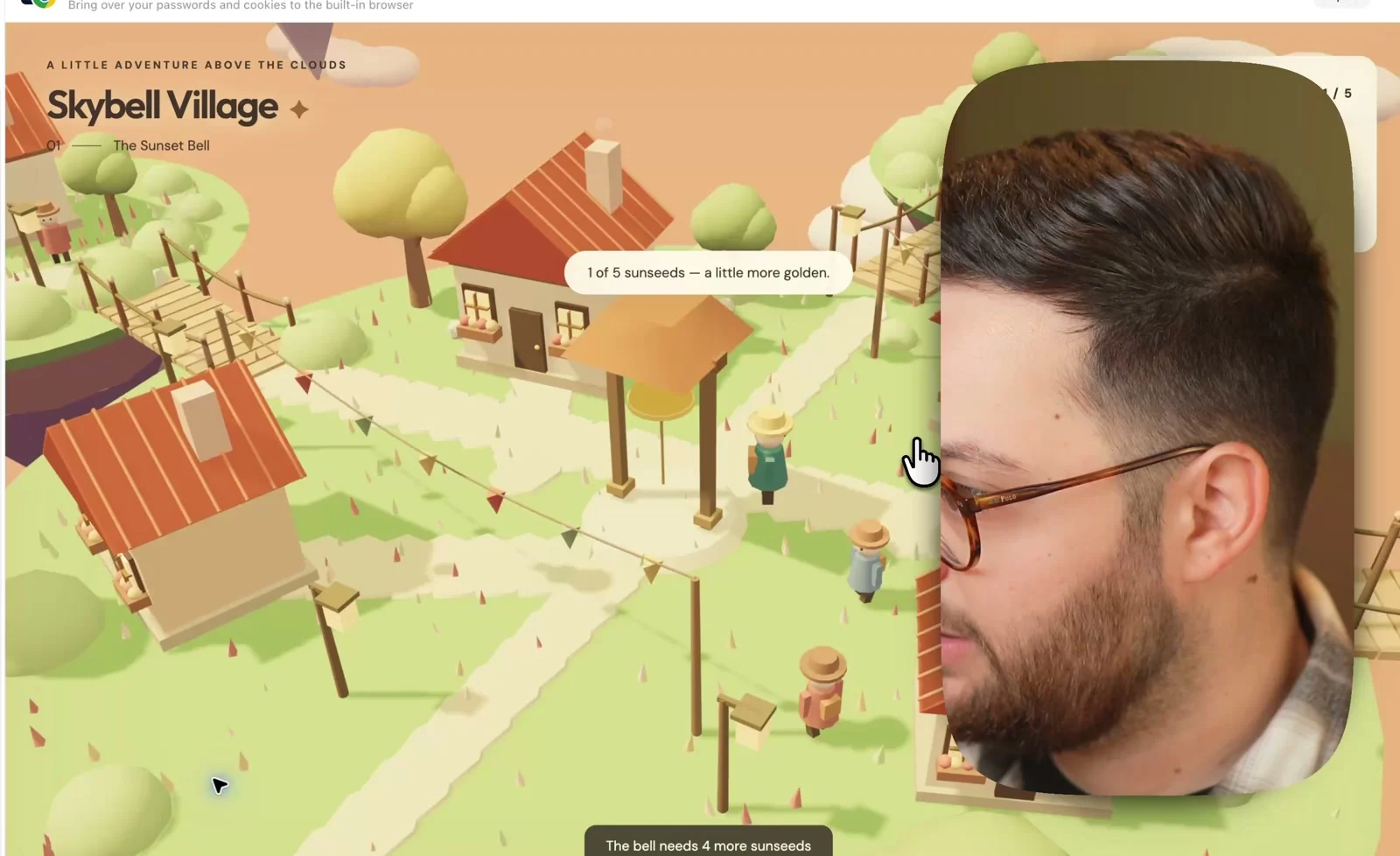
The line doing the heavy lifting is use the critic-agent loop above. That refers to a reusable add-on you can bolt onto any visual build:
Use a separate critic agent to screenshot the result from a few angles, score it 0-10 against what a great version looks like, fix the ranked issues, and loop until it scores 8+ or you've done 4 rounds. Don't stop at the first version.Without it you get the first draft. With it, the model reviews its own work and keeps going. For long builds there is a second trick worth knowing:
/goalKick a big build off with /goal and it keeps working until the job is actually done, rather than until it runs out of momentum.
What makes this different from image generation is persistence. It did not produce one artefact and stop. It held a large, complicated thing in its head step after step without breaking what it had already built.
The honest catch. It gets you about 90% of the way. Expect a few more rounds of prompting to reach the version you actually wanted.
3. It codes, and it finds your security holes
OpenAI calls Astra their best coding model. For once that is not only them saying it: the CodeRabbit result above is an outside measurement, and the gap was biggest on the hardest category, bugs that span a whole codebase.
I asked it to build a real site, not a mockup:
Build me a personal website as a real, working site with slick scroll-triggered animations, where things fade, slide, and parallax in as you scroll (award-winning-site style, built with GSAP ScrollTrigger). I can use it today. Write it, run it, and test it yourself. Take screenshots, click through every button, fix whatever breaks, and keep looping until it works end to end. Then host it locally and give me a live link.It asked a few clarifying questions, then went quiet and worked. The part that is genuinely strange to watch is the testing: it moved the cursor itself, took its own screenshots, clicked through every button, found what was broken and fixed it. My hands were nowhere near the mouse.
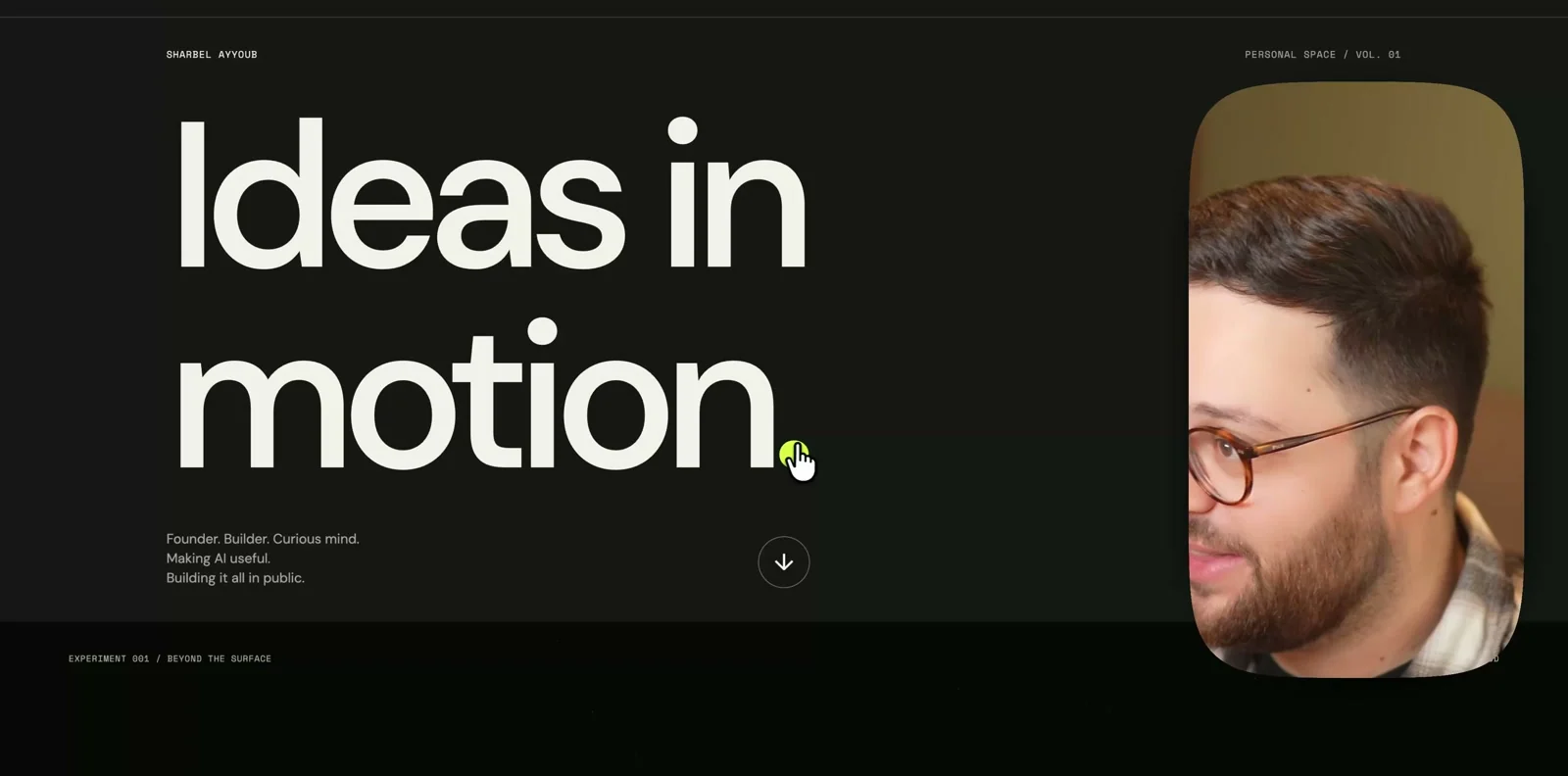
It used GSAP ScrollTrigger because I named it. Naming the library you want is worth doing: it removes a decision the model would otherwise make badly.
Then the part I actually care about. You can point it at your own site and tell it to find what is wrong with it:
Here's my website's code. Act as a security auditor. Find the real vulnerabilities, rank them worst-first, and for each one show me the exact fix and apply it. Do NOT touch anything that sends, spends, or deletes without asking me first. Give me a before-and-after report.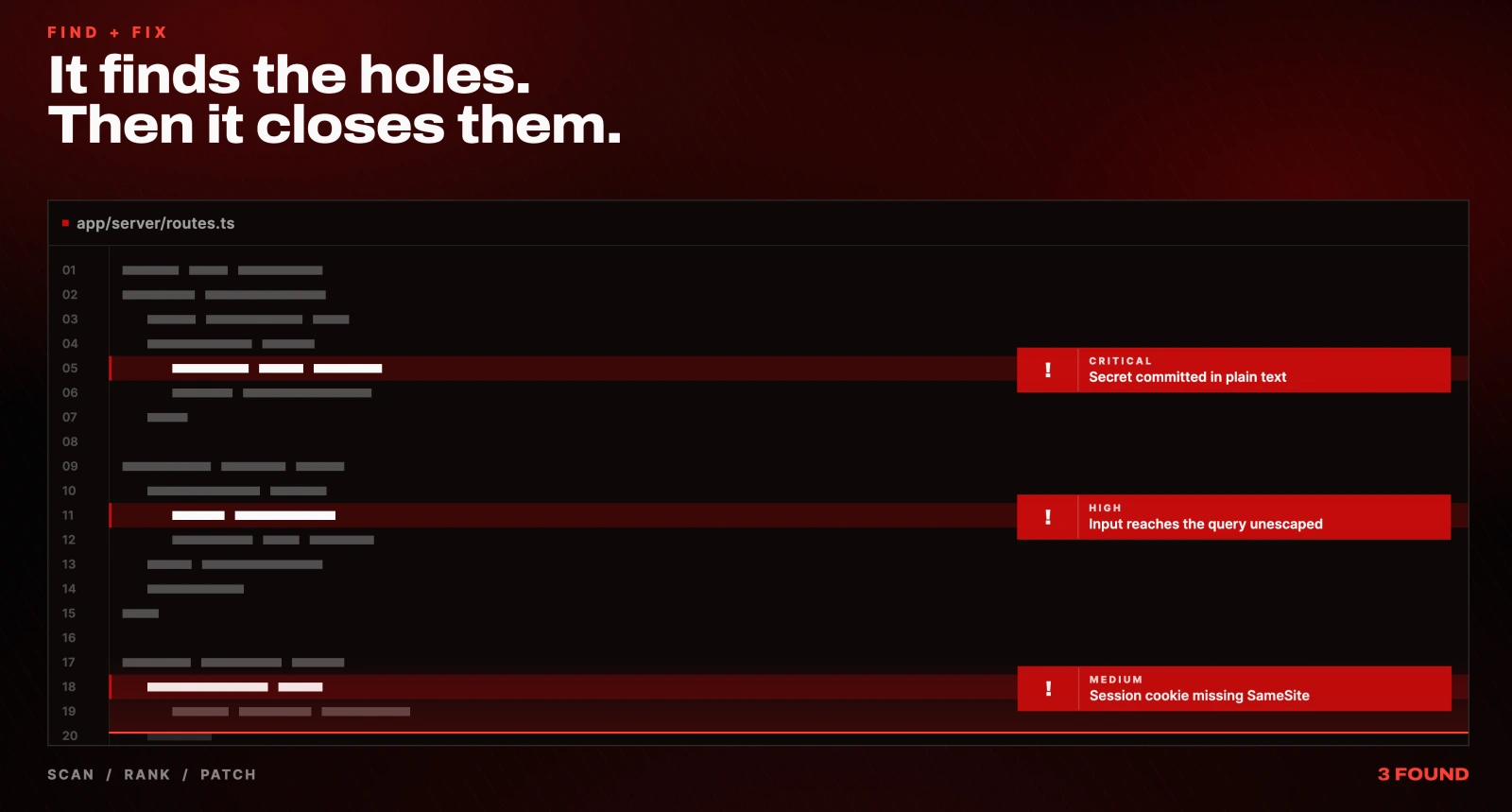
It ranks worst-first and patches as it goes. Do NOT touch anything that sends, spends, or deletes without asking me first is not optional, it is the whole guardrail.
One thing needs saying plainly. This skill is dangerous pointed at somebody else's property, and OpenAI's own safety overview classes Astra's cyber capability as critical. Use it on things you own. This is not a how-to for breaking into anything.
4. It drives your creative tools
This is the capability that is hardest to believe until you watch it. Astra does not generate a flat image and stop. It opens the software you already use and operates it.
In OpenAI's own launch demos it drove Blender, the 3D package professionals use, and real engineering software, click by click. That is the verified proof that GUI-driving is real rather than a mock-up.
So I pointed it at my own edit suite:
You are a senior video editor. Edit this video for me and create animations using Remotion to bring the concepts I'm talking about to life, cut the silences, or mistakes.That is the entire prompt. It used Final Cut Pro, which is the editor installed on my machine, and it wrote custom animations in Remotion to illustrate the concepts I was talking about. In one shot.
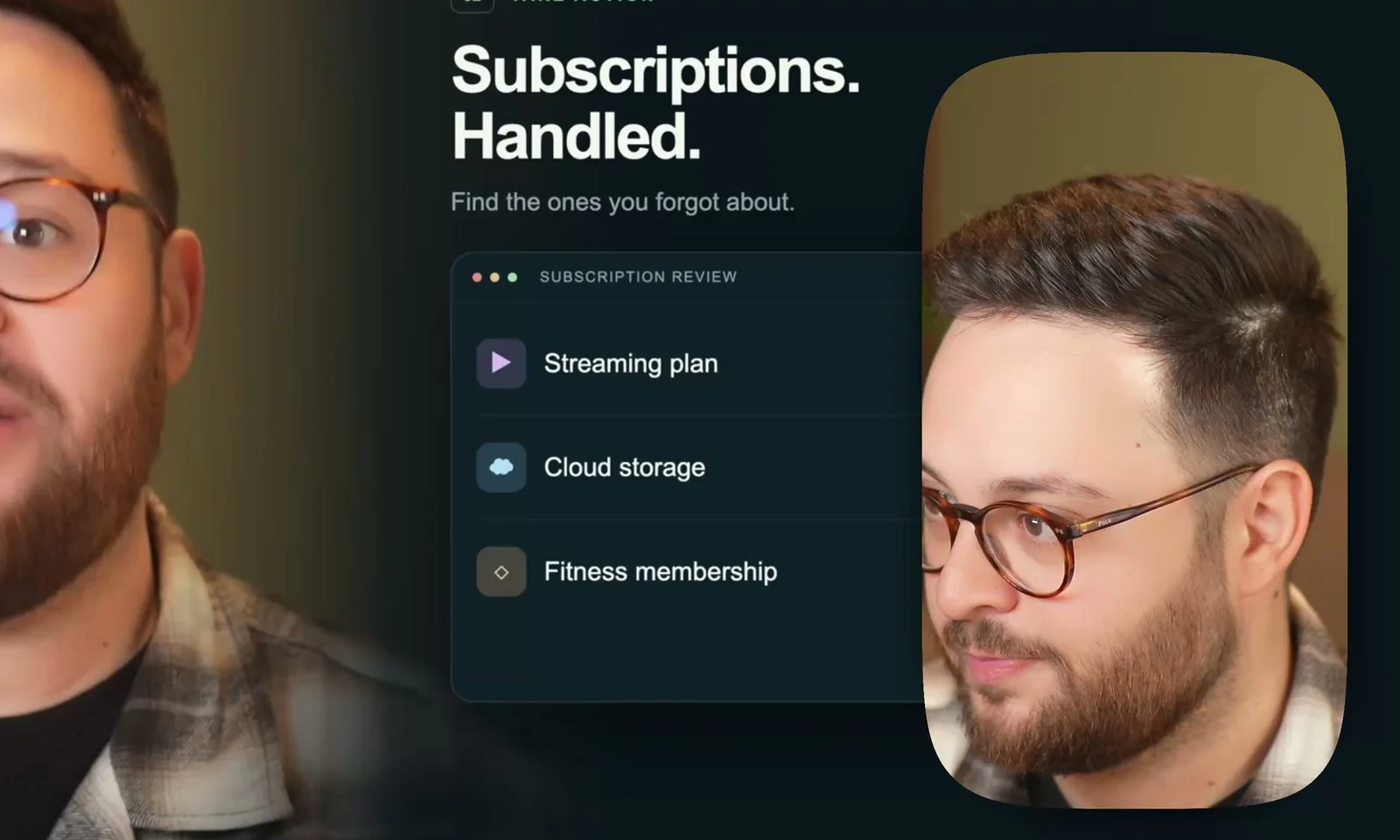
It burned through my credits and hit a capacity limit that cost me a reset. It was still worth it.
The same approach works for Canva, a photo editor, or anything else with a normal interface. Ask for the finished asset, not the idea for one.
The honest catch. Driving creative tools is harder than filling a web form. Expect roughly 80% of the way there, then a few more prompts. It is rarely the one-shot everyone claims.
5. It researches and commits to one answer
This is the one I reach for almost every day, and it is the least flashy on the list.
You know the rabbit hole. Which machine should I buy? Two hours later you have forty tabs open and every review contradicts the last one.
I need to buy a desktop PC. Here's what I actually care about: I want to be able to run local AI models comfortably, I want to be able to run my local agent setup comfortably, and I want to be able to edit videos and render them comfortably. My budget is $2,000-$5,000. Go read real reviews and specs across the web, weigh the top options against MY priorities, and come back with ONE clear recommendation plus the reasoning. Then tell me the runner-up, and who each option is NOT for.It worked for one minute and nine seconds and came back with one answer: a Mac Studio M5 Max, 128GB of unified memory, 1TB SSD, at €5,969 including VAT, about $6,955, with a delivery estimate and a note that it was not in stock.
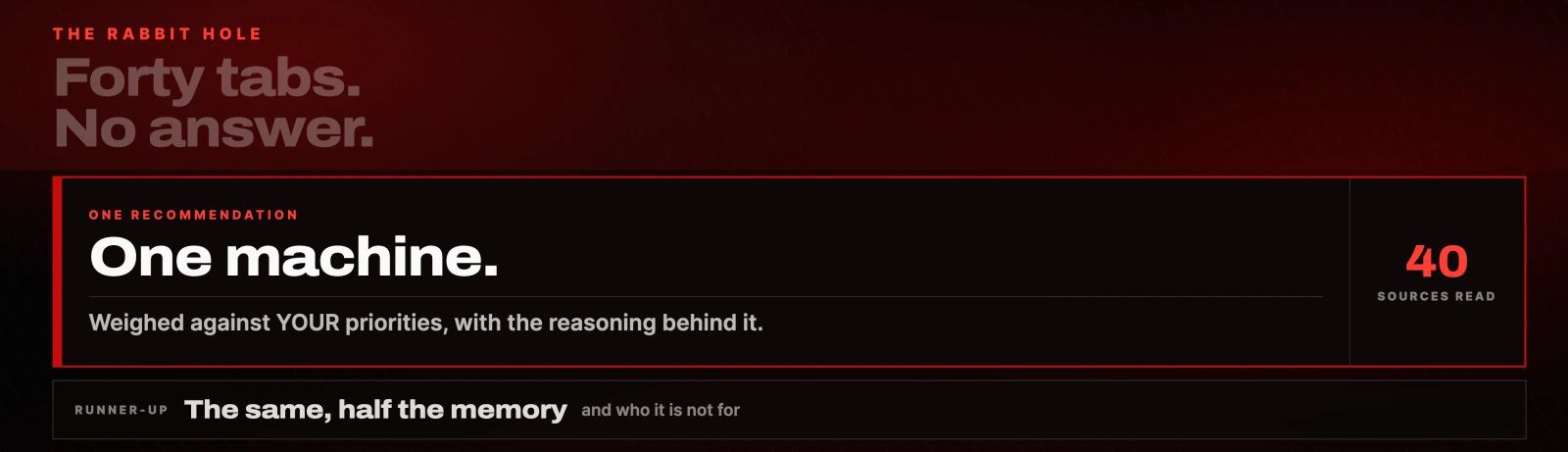
Two details make that useful rather than impressive. It went over the budget I gave it and explained exactly what the extra money bought against each priority I had listed. And it named the runner-up, the same machine with 64GB instead of 128GB, plus who each option is not for.
Every model before this could summarise and hand you ten options. This one gathers the information live, with no plugins or extensions installed, and then commits.
Where GPT-6 Astra still falls short
Worth knowing before you pay for it:
- It is slow on easy things. For a task you could do in two minutes, doing it yourself is still faster.
- It gets to about 90% and needs a few more prompts to finish. The one-shot claims are overstated.
- It burns through usage fast. Two of these five tests hit capacity limits.
- The headline benchmarks are OpenAI's own. Only the CodeRabbit number is independent.
- It still slips. Keep it away from anything that spends money unsupervised.
Is GPT-6 Astra worth it?
Here is where I land. Astra is not just a smarter chatbot. It is the first one that reaches out and touches the real world in a way you can rely on, and that is the actual jump.
If you build things or run a business, this is the first model that feels less like a tool and more like someone you can hand work to. It is not perfect. But the ceiling is higher than anything I have used.
Every prompt, free
All five prompts are in the sections above, in full, nothing gated. Copy any of them straight into ChatGPT.
The two reusable add-ons are worth more than the rest put together: the critic-agent loop, which makes the model review and improve its own work, and /goal, which keeps it running until a big job is genuinely finished. Bolt the loop onto any visual build and the quality of what comes back changes.
Tools and sources
- ChatGPT, where Astra runs
- OpenAI: introducing GPT-6 Astra
- OpenAI: safety overview for GPT-6 Astra
- OpenAI computer use guide, the practical setup page
- CodeRabbit's code-review evaluation, the independent benchmark
- GSAP ScrollTrigger, the animation library used for the site
- Remotion, for animations written in code
- Final Cut Pro and Blender, the applications it drove
- Canva, for the same trick on design work
What to do next
Pick the one that maps to a job you are avoiding. If it is the inbox, use prompt one and add Do NOT send anything before you run it. If you own a website, run the security audit prompt on it this week, because the same capability is available to people who do not own it.
Then bolt the critic-agent loop onto whatever you try next. It is the single line that moves the output from a first draft to something you would actually ship.
Questions
- What is GPT-6 Astra?
- GPT-6 Astra is OpenAI's flagship model, released on 3 September 2026 as the successor to GPT-5.6 Sol. Its defining capability is computer use: it operates a browser and desktop applications directly rather than only producing text. It has a context window of about 1.05 million tokens and runs on OpenAI's servers, so a long task continues after you step away.
- Can GPT-6 Astra really use a computer?
- Yes, and it is the main reason to care about it. Computer use is not new, and OpenAI's Operator and Anthropic's computer use both predate it. What changed is reliability: OpenAI reports about 72.6% on the OSWorld benchmark, up from 65.7%, at roughly twice the speed. Those are OpenAI's own figures, so treat them as a vendor claim.
- Is GPT-6 Astra better than Claude Opus 5 at coding?
- On one independent measurement, yes. CodeRabbit, an outside firm that reviews code professionally, found Astra caught about 22% more bugs than Claude Opus 5, with the largest gap on bugs spanning a whole codebase. That is the only non-OpenAI benchmark in this comparison, so it carries more weight than the headline numbers.
- How much does GPT-6 Astra cost?
- Through the API it is $10 per million input tokens and $50 per million output tokens, with cached input at $1 per million. It is also available in ChatGPT. Computer-use tasks consume usage quickly: two of the five tests here hit capacity limits.
- Is it safe to point GPT-6 Astra at my own website?
- Yes, if you own the site and you constrain it. Add a line telling it not to send, spend or delete anything without asking first, and review before applying. OpenAI's own safety overview classes Astra's cyber capability as critical, which cuts both ways: use it to find your own weaknesses before someone else finds them, and never point it at property that is not yours.

You made it to the end
That is the whole build. Want the next one?
Read next

How to Stop GPT-6 Astra Burning Through Your Tokens (6 Fixes)
Why Astra drains your ChatGPT and Codex limits so fast, and the six fixes that cut it, in order of what saves the most.

OpenAI Dots: What It Actually Does, What It Costs, and Whether It's Worth It
An honest review from someone who has run always-on agents for a year, including the Pro plan cut OpenAI made the same day.

Grok Bot Review: Is the $20 Plan Worth It?
Two weeks with Grok Bot at its new $20 price, including the usage costs, the shared-machine security model and the account risk the demos leave out.