Mac Mini Local LLM: What 16GB Actually Runs
I tested a 16 GB M4 Mac mini against a $200 AI subscription. Here is what fits in memory, how fast it runs, and what it costs.
From the videoCan A Mac Mini Replace Your $200 AI Subscription?
A Mac mini will not replace a $200 AI subscription, but it will replace the part of it you are quietly overpaying for. On a 16 GB Mac mini you get about 10 to 12 GB for the model, which runs a 9B model at roughly 13 tokens a second. The frontier models need 236 GB. Here is what fits, what it costs, and the one check to run before you buy anything.
How much RAM do you need to run an AI model locally?
The whole model has to fit in memory. If it does not fit, it does not run.
On a Mac that memory is shared. The same 16 GB runs macOS, your browser, your apps and the model. Open Activity Monitor, click Memory, and look at Memory Used before you load anything. On my M4 Mac mini, macOS and my apps were already sitting at 13.74 GB of 16 GB.

It gets tighter. macOS only lets the GPU claim a portion of that shared memory, so on a 16 GB machine you are working with roughly 10 to 12 GB for the model, not 16.
That one number decides everything else. Model size is measured in parameters, which is roughly how many connections the model's brain has. More parameters usually means smarter and always means bigger. The 27B models you see in every thumbnail are 16 to 18 GB, so on a 16 GB Mac they do not load at all.
How to check whether the model actually fits
Run this while the model is loaded:
ollama psIf the PROCESSOR column says 100% GPU, the model fits and you are fine. If it
says anything with CPU in it, the model is spilling out of memory and it will
crawl. This is the single most useful check in Ollama, and
it takes two seconds.
How fast will a local model run?
You can predict this before you download anything.
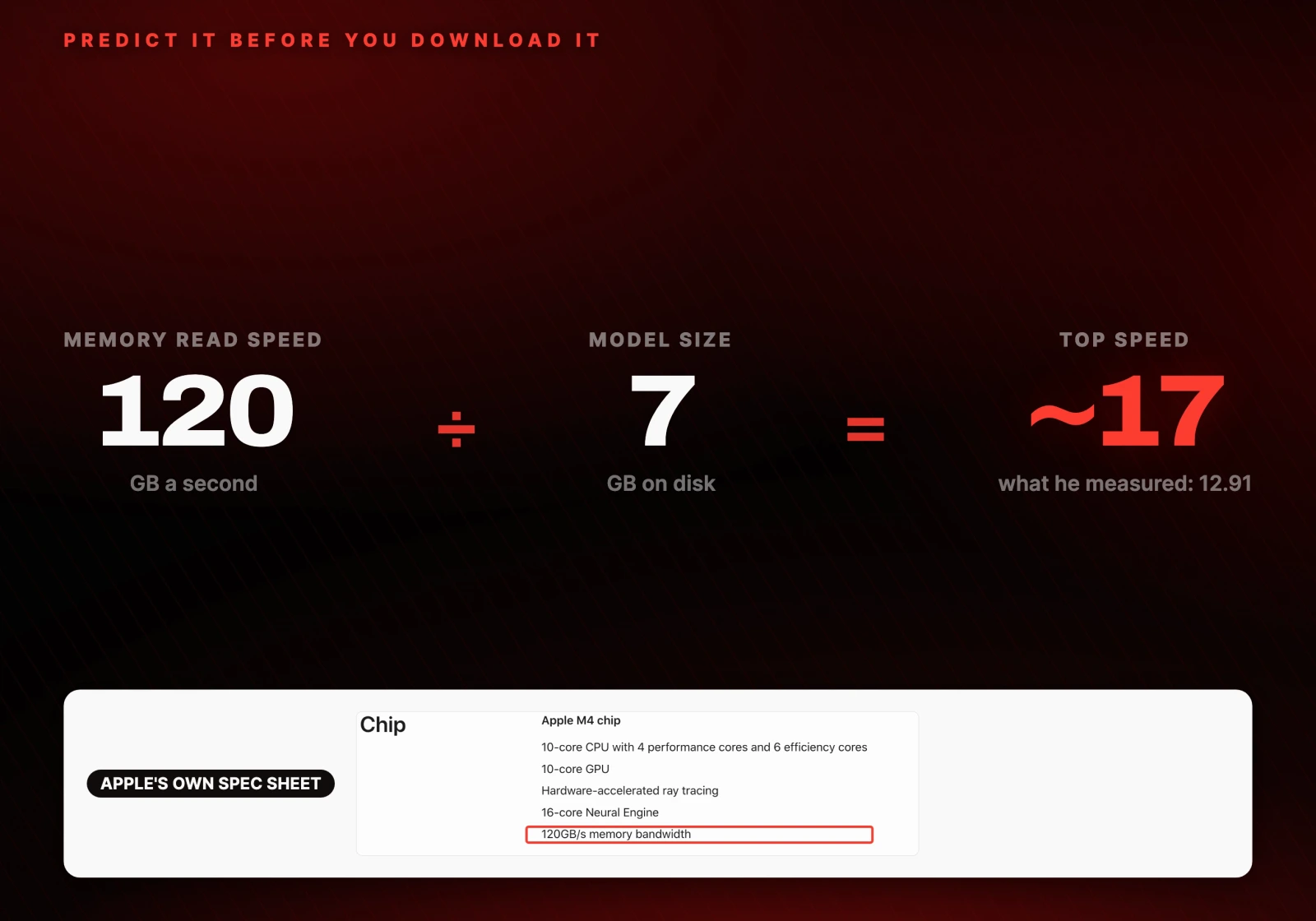
Every time the model writes one token, which is about three quarters of a word, the chip has to read the entire model out of memory. Again, for every token. So the speed ceiling is:
tokens per second ≈ memory bandwidth (GB/s) ÷ model size (GB)Apple's own spec sheet puts the M4 Mac mini at 120 GB/s. A 7 GB model should therefore land somewhere around 15 to 20 tokens a second.
What it actually measured
I ran Qwen3.5 9B against the same prompt I gave Claude, and asked it to summarise the Mac mini Wikipedia page.
ollama run qwen3.5:9b --verboseThe --verbose flag prints the timings after every answer, which is where the
real number lives:
total duration:       2m20.934942333s
prompt eval count:    491 token(s)
prompt eval rate:     135.06 tokens/s
eval count:           1769 token(s)
eval rate:            12.91 tokens/s
12.91 tokens a second, against a predicted 15 to 20. The formula gets you close enough to decide with, which is all you need it for.
Why agents are much slower than chatbots
Almost every speed number online is measured on a short question like "write me a poem". That is not how an agent talks to a model.
Every time an agent asks anything, it also sends its instructions, its memory, the list of every tool it can use, and the whole conversation so far. The model has to read all of that before it writes a single word back. That reading step is called prefill, and on a long agent prompt it dominates the wait.
There is a setting here that will break your agent if you miss it. Ollama defaults to a small context window, around 4,000 tokens. An agent needs at least 64,000, or it forgets what it is doing halfway through the job.
Set it for the session:
/set parameter num_ctx 65536Or set it for the whole server, which is what you want if an agent is calling it:
OLLAMA_CONTEXT_LENGTH=65536 ollama serveOr per request through the API:
{ "model": "qwen3.5:9b", "options": { "num_ctx": 65536 } }Raising context costs memory, so on 16 GB it eats straight into the 10 to 12 GB you had for the model. This is the real reason 16 GB is tight for agent work and fine for chat.
Can a Mac mini run the best open models?
No, and the gap is not close.
On the Artificial Analysis chart the best paid models score around 58. The best open models, the ones you can download for free, sit around 44 to 46. That gap is genuinely narrowing.
The problem is loading them. The best open model on that chart is over a trillion parameters. Even crushed down to a fraction of its size it still needs around 236 GB of memory just to load. The biggest Mac mini you can buy holds 64 GB.
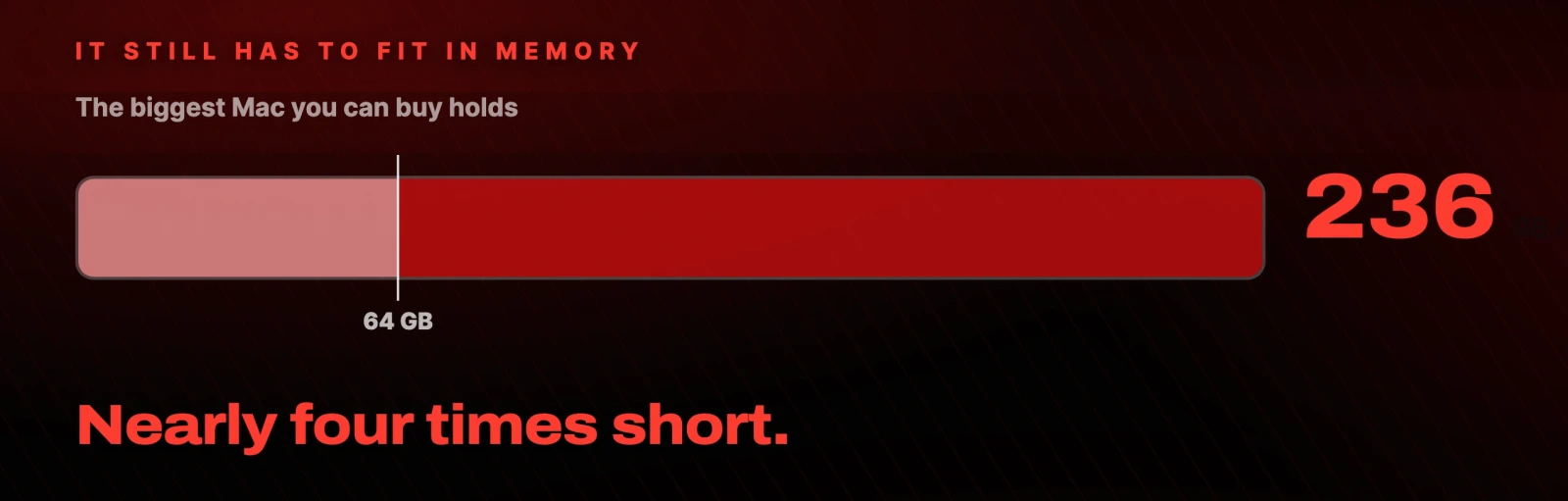
To run that model at home you would need a Mac Studio with 256 GB, which is about $9,500. Against a $200 a month subscription that machine takes roughly four years to pay for itself, and at the end of four years it is still slower than the subscription and still not as smart as the chart says, because you had to compress the model to make it fit.
Is running a local model actually cheaper?
Here is the comparison people get wrong. When you run a small model locally you are not replacing $200 of frontier model. You are replacing what that same small model costs to rent, and that is almost nothing: about 10 cents per million tokens on OpenRouter.
So even an agent running all day is a few dollars a month, not $200. The money was never the reason to do this.
What a Mac mini beats a subscription at
Three things, and none of them are price.
Privacy. When the model runs on your machine the data never leaves the room. Your inbox, your calendar, your documents. Nothing is sent to a company. This is the reason most people say they want a local model in the first place.
No cap. No five hour limit, no weekly limit, no message telling you to come back later. It runs all day, every day.
Running cost. Apple rates the Mac mini at 4 W idle and 65 W flat out. Electricity here in the Netherlands is about €0.26 per kWh, so idling all month costs about €0.74. Running flat out, 24 hours a day for a month, costs about €12.
On hard reasoning the paid model wins and it is not close. On private work, repetitive work, and jobs that run while you are asleep, the local one is not just cheaper. It is better.
Which Mac mini should you buy for local AI?
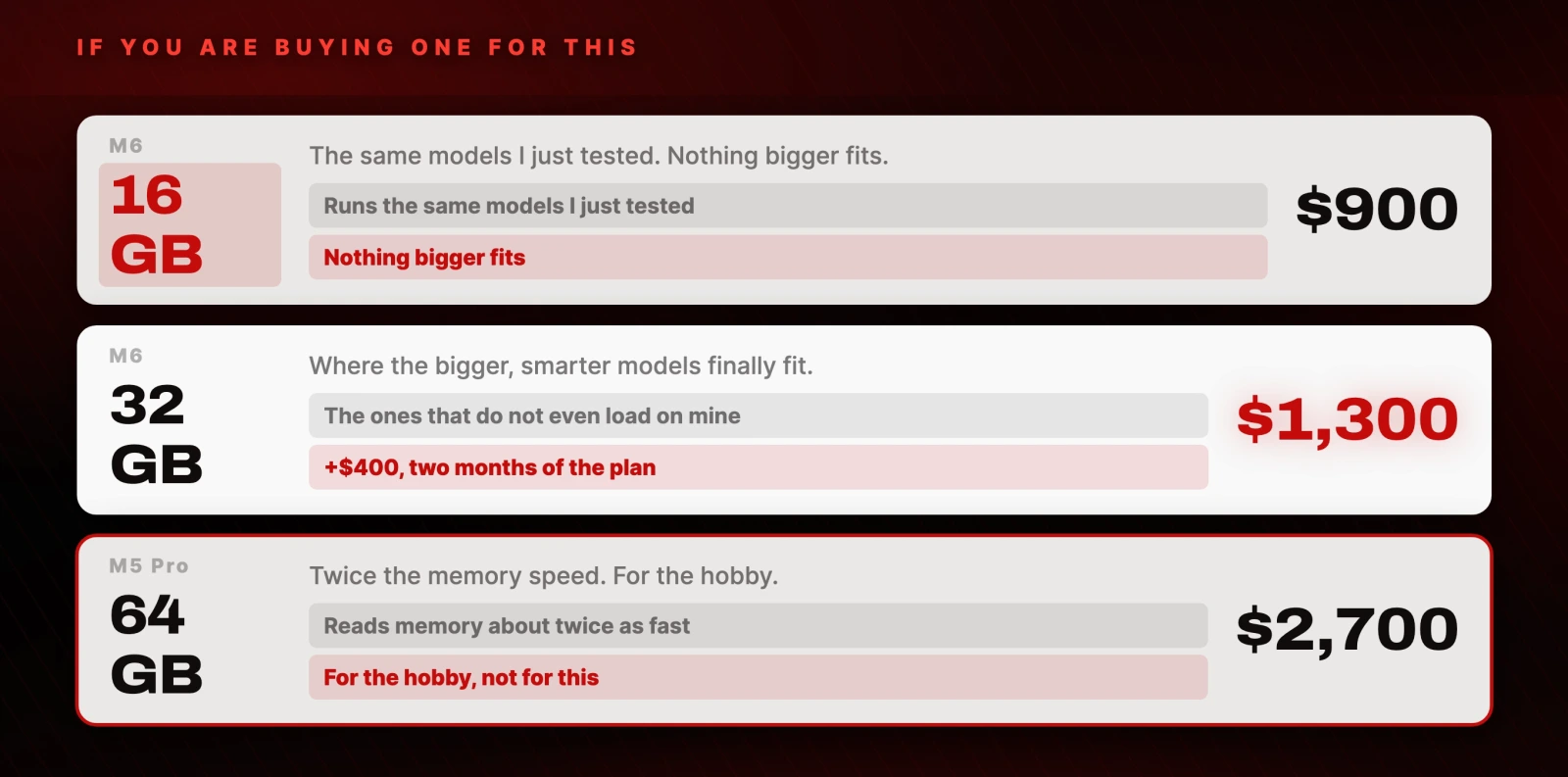
| Machine | Price | What it runs |
|---|---|---|
| M6, 16 GB | $900 | The same 7 to 9 GB models tested here. Nothing bigger fits. |
| M6, 32 GB | $1,300 | Where the bigger, smarter models finally load. The floor. |
| M5 Pro, 64 GB | $2,700 | Reads memory about twice as fast. For the hobby, not for this. |
The jump from 16 GB to 32 GB is $400, which is two months of a $200 plan. If you are buying a machine specifically for this, 32 GB is the floor.
The move to make before you buy anything
Spend one week reading your own usage first.
If you are not actually hitting your limit, drop to the $20 or $100 plan today. Same models, same access, more money in your pocket, no hardware and nothing new to learn. Nobody selling you a Mac mini will tell you that.
What the Mac mini actually is, is not a replacement. It is the best home for always-on agents you own, like Hermes Agent or OpenClaw. The local brain handles the private work and the scheduled jobs. When a job is too hard, it hands that one task to the paid model.
Which model to run on which Mac
| Mac memory | Usable for the model | What to run | Realistic speed |
|---|---|---|---|
| 16 GB | ~10 to 12 GB | 7 to 9 GB models (Qwen3.5 9B) | ~13 tokens/s |
| 24 GB | ~16 to 18 GB | 9 to 14 GB models | ~15 to 20 tokens/s |
| 32 GB | ~22 to 24 GB | 27B class, 16 to 18 GB | ~15 to 20 tokens/s |
| 64 GB | ~48 GB | 27B comfortably, larger at low quant | ~30 tokens/s |
The settings I used, in full:
/set parameter num_ctx 65536OLLAMA_CONTEXT_LENGTH=65536 ollama serve
ollama run qwen3.5:9b --verbose
ollama psCheck ollama ps says 100% GPU after every change. If it says CPU, lower
num_ctx or use a smaller model.
Further reading
- Ollama and the context length docs
- Qwen3.5 on Ollama
- Artificial Analysis, the model intelligence chart
- Apple's Mac mini (2024) tech specs, where the 120 GB/s comes from
- Mac mini current models and pricing
- OpenRouter for what a model costs to rent
- Claude pricing and ChatGPT pricing
- Hermes Agent and OpenClaw
Questions
- How much RAM do you need to run an LLM on a Mac mini?
- 16 GB is the practical minimum and it only runs 7 to 9 GB models. macOS only lets the GPU claim part of the shared memory, so a 16 GB machine gives you roughly 10 to 12 GB for the model. If you are buying specifically for this, 32 GB is the floor.
- How fast does a local model run on a Mac mini?
- Roughly memory bandwidth divided by model size. The M4 Mac mini reads memory at 120 GB/s, so a 7 GB model should hit 15 to 20 tokens a second. Measured on a real prompt it came out at 12.91 tokens a second.
- Can a Mac mini replace a $200 AI subscription?
- Not on its own. The frontier open models need around 236 GB of memory to load, and the Mac Studio that could hold them costs about $9,500, which takes four years to pay back against $200 a month. A Mac mini replaces what the small model costs to rent, which is about 10 cents per million tokens.
- Why is my local model slow with an AI agent but fast in chat?
- An agent sends its instructions, memory, tool list and full conversation before every question, and the model must read all of it before answering. That reading step is called prefill. Ollama also defaults to about 4,000 tokens of context, so raise num_ctx to at least 65536 for agent work.
- How do I check if a model fits in memory on a Mac?
- Run ollama ps while the model is loaded. If the PROCESSOR column reads 100% GPU it fits. If it mentions CPU, part of the model is outside memory and generation will be very slow.

You made it to the end
That is the whole build. Want the next one?
Read next

Hermes Agent: 7 Real Jobs It Runs, With the Prompts
The seven jobs I hand Nous Research's free, open-source agent, and the exact prompt to copy for each one.

How to Run Claude Code for Free With a Local Model
Keep the real Claude Code and point it at a model on your own machine. Three free routes, every command, and the trade-off each one asks for.

Hermes Agent Guide: 7 Setup Mistakes and the Exact Fixes
Memory that sticks, cheaper replies, skills, quiet cron jobs, /goal gates, subagents and a lighter context, with every prompt ready to paste.