Hermes Agent: 7 Real Jobs It Runs, With the Prompts
The seven jobs I hand Nous Research's free, open-source agent, and the exact prompt to copy for each one.
From the video7 Hermes Agent Use Cases That Run My Entire Life
Hermes Agent is a free, open-source AI agent from Nous Research that runs on your own machine, on a schedule, without you sitting in a chat window. That is the whole difference. A chatbot answers when you ask. An agent holds a job and does it while you sleep.
I run seven jobs on mine: my meetings, my inbox, a 24/7 watchdog, my client relationships, one shared memory across every tool I use, my phone, and my mornings. Every prompt below is copy-pasteable and ungated. Paste them straight in.
How to install Hermes Agent
One line on macOS or Linux, and it works in WSL2 on Windows too:
curl -fsSL https://hermes-agent.nousresearch.com/install.sh | bashIt is MIT licensed, the source is at NousResearch/hermes-agent, and the docs cover the native Windows path and the gateway. Nothing below needs a paid plan except the memory providers in job five, and one of those is free at the volume most people run.
The seven jobs are in the order I added them, which is roughly the order of how much time each one gave back.
1. Turn every meeting into assigned tasks
This one fixed a problem that was costing us real money.
I use Fireflies so there is a transcript of every call. Hermes knows my calendar, so the second a meeting ends it goes and grabs that transcript on its own. It reads the whole thing, finds every action item, works out who owns what, and creates the tasks on our Notion board assigned to the right person.
Before this we would have a great meeting, decide on eight things, and half of it would evaporate. Someone forgets to write it down. A task never gets assigned. Human error, every single time. Now the meeting ends and the tasks are already on the board.
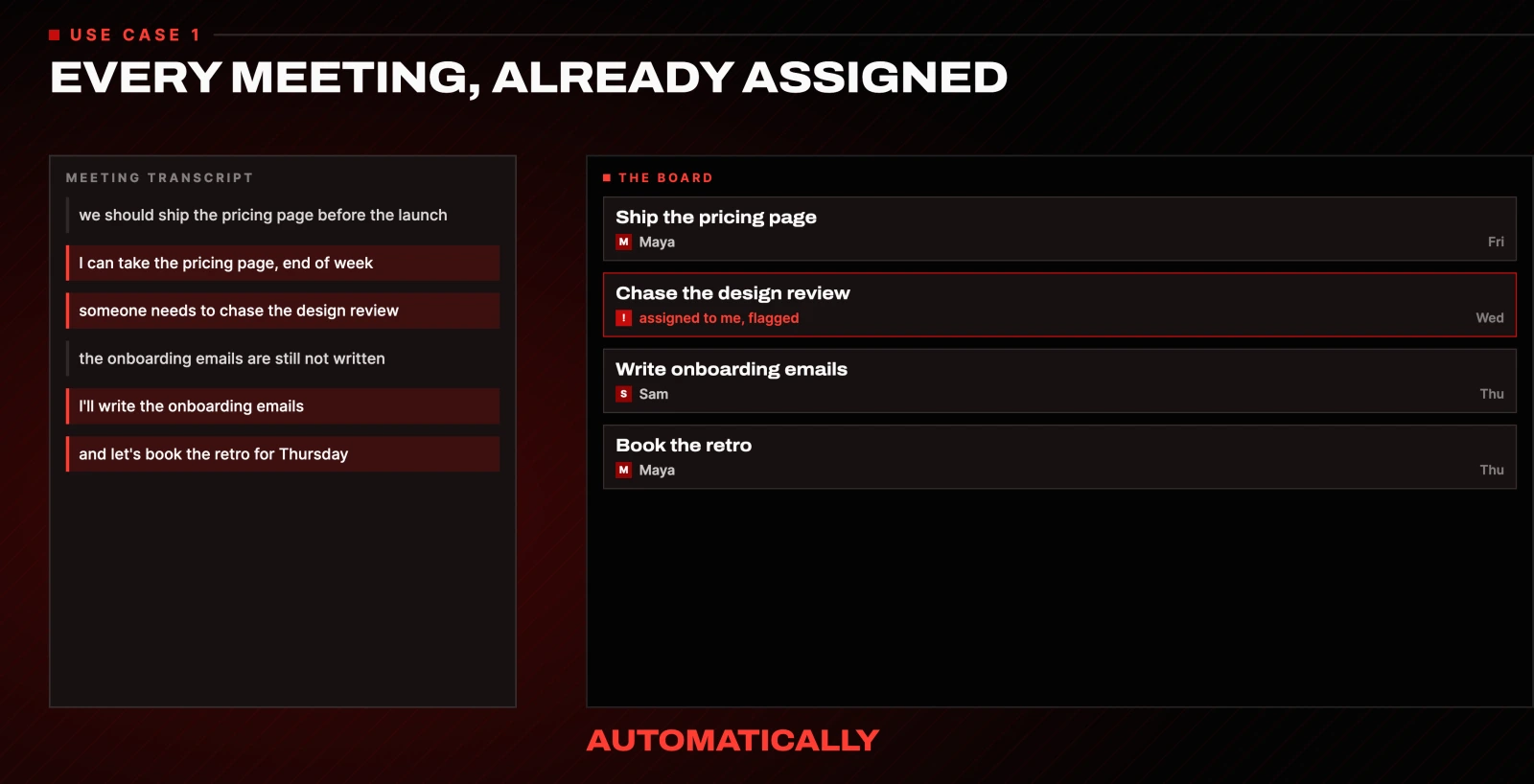
Connect your meeting notes tool and your Notion workspace to Hermes, then paste this:
When a meeting ends on my calendar, automatically fetch its Fireflies
transcript. Pull every action item and who owns it, and create them as
tasks on my Notion board assigned to the right person. If an owner isn't
clear, assign it to me and flag it. Do this after every meeting from now on.
Swap "Fireflies" for whatever you use. You set it once and it runs after every call from that point on.
A chatbot cannot do this. It is not in your meeting, it does not know your calendar, and it is not going to open Notion after every call and hand out work.
2. Triage your inbox and draft the replies
I am terrible at email. With the volume I get I lose track of conversations constantly, and the emails that matter get buried. Some of those emails are worth actual money.
So Hermes watches my inbox. It flags the leads, the deals and the time-sensitive ones, and it has a draft waiting in my voice. I review and tell it to send.
This is not a flex, it is just a small function that turned out to be valuable: this exact setup has helped us close tens of thousands of dollars of deals in the last month that I would probably have let rot in my inbox.
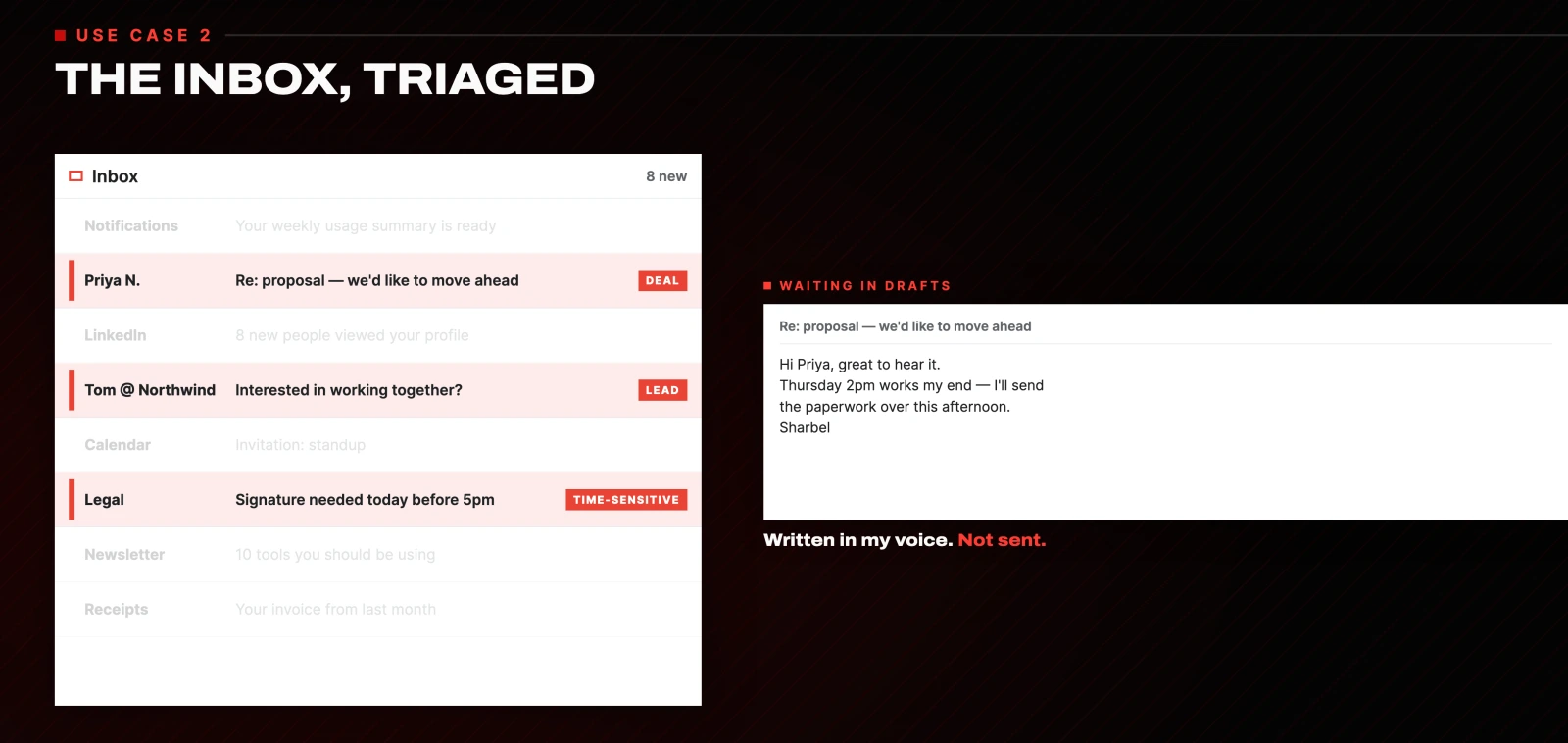
Connect Hermes to your email, then:
Watch my inbox throughout the day. Flag anything that's a real lead, deal
or time-sensitive, and write a reply as a draft in my voice, learning my
style from my sent folder. Never send anything automatically. Leave
everything in drafts for me to approve.
The catch: keep it on drafts, never auto-send. The last thing you want is your agent hallucinating your rates and sending a lead the wrong number. You want your eyes on anything that matters before it goes out.
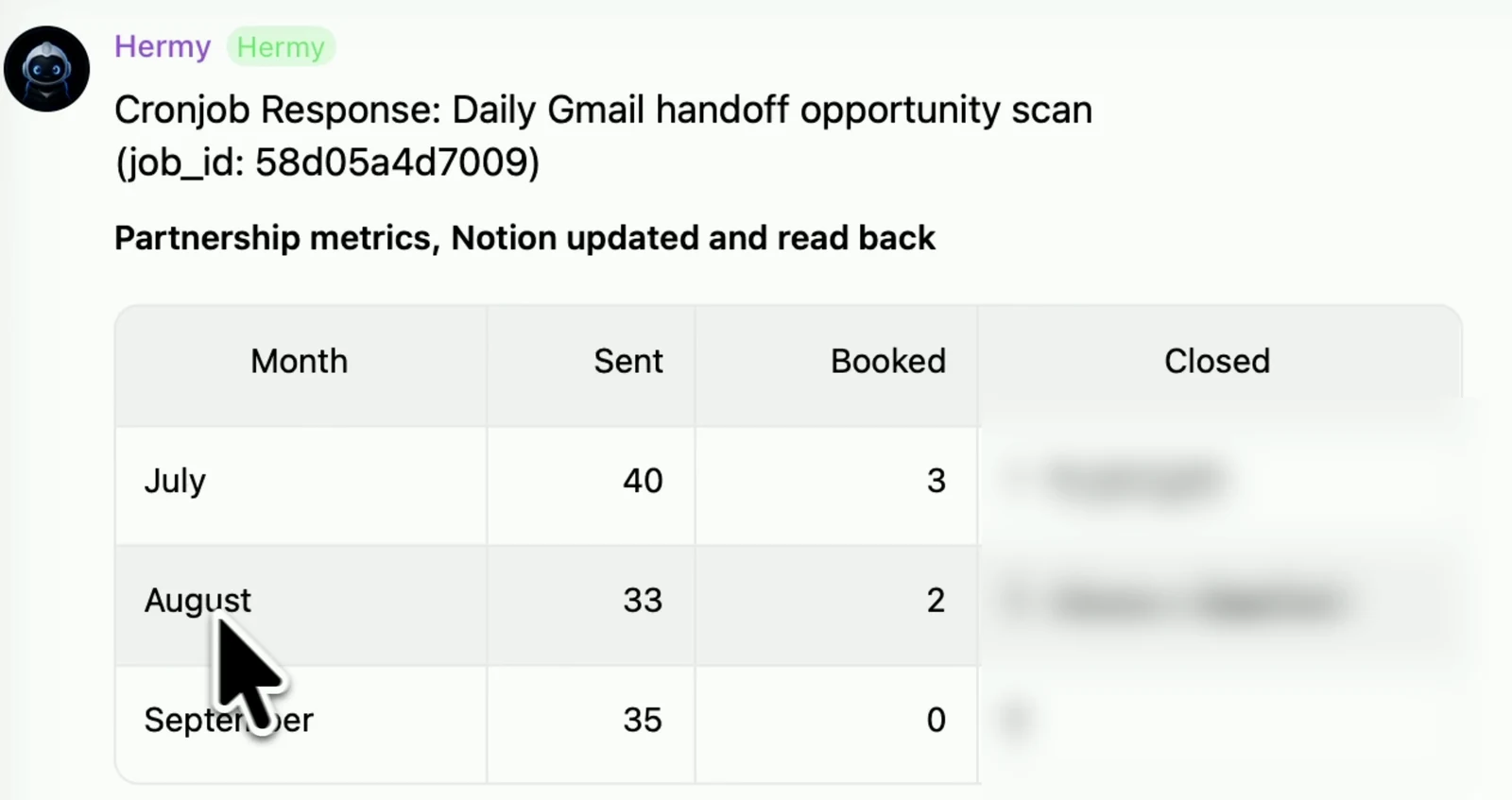
Here is what a real overnight scan hands me in the morning. Client names are blurred, the rest is untouched:
3. Watch anything, around the clock
I call this one the Sentinel, and it is the job that shows what an always-awake agent actually means. It runs in two directions.
Inward, it guards your world. I have it watching my signups, my site and my reviews. The moment something is off, a number dips or the site goes down, it pings me on Telegram. You can wire it to almost anything with a webhook. The good part is that it is ahead of me: I find out something broke before it turns into a fire, instead of after a customer tells me.
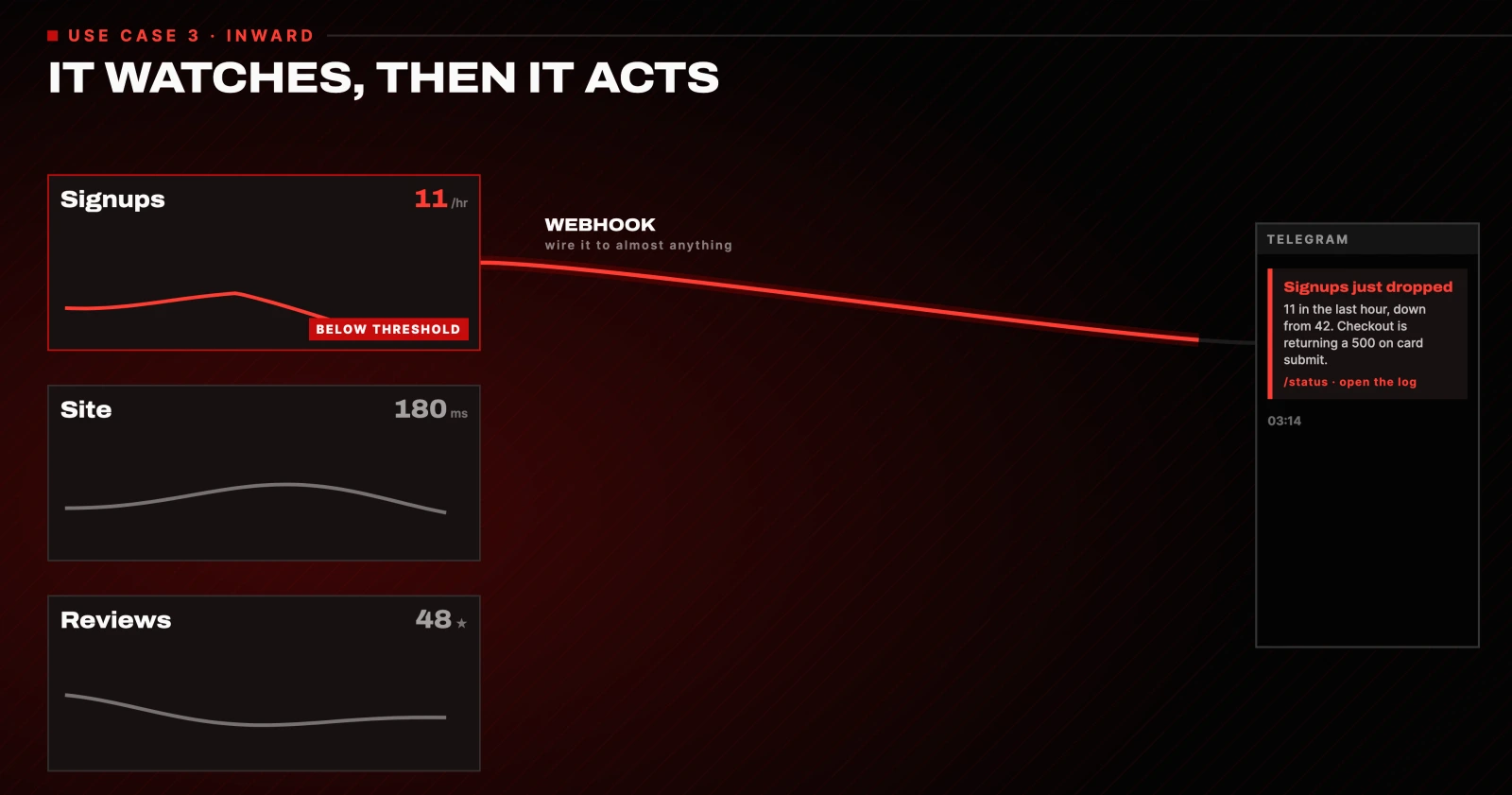
Ask Hermes to create the webhook first, in plain words:
Create a webhook for this website for me: https://yoursite.comThen give it the job:
Monitor my signups, site uptime and new reviews around the clock. If
signups drop below 20 in an hour, or the site returns an error, message me
on Telegram right away with exactly what happened and the link. Only alert
me if those trigger. No noise.
Outward, it hunts. Same skill, pointed at the internet: concert tickets the second they drop, the reservation that is impossible to get, the product that is always sold out. It camps on the page around the clock, and the moment the thing is live it goes in, logs in, fills in your details and grabs it. You wake up to the reservation booked.
Watch this page around the clock. The moment it goes live, log in with my
saved details and reserve it or add it to my cart. Then stop and ask me
before any payment.
No chatbot is refreshing a ticket page at 2am. This will.
Two catches here. Be specific about what "wrong" means or it will cry wolf at you all day. And put a gate on anything that spends money. Let it take you right up to the checkout, but you approve the final click.
4. Catch a client going quiet before they churn
If you have clients, this one is gold.
Hermes keeps a live read on every client conversation. It tracks who is happy, who has gone quiet, and who has not heard from us in too long, and it flags it before it becomes a problem.
What kills service businesses is not the big blow-ups. It is the quiet ones: the client who slowly goes cold and churns before you noticed. This catches that early, while it still matters.
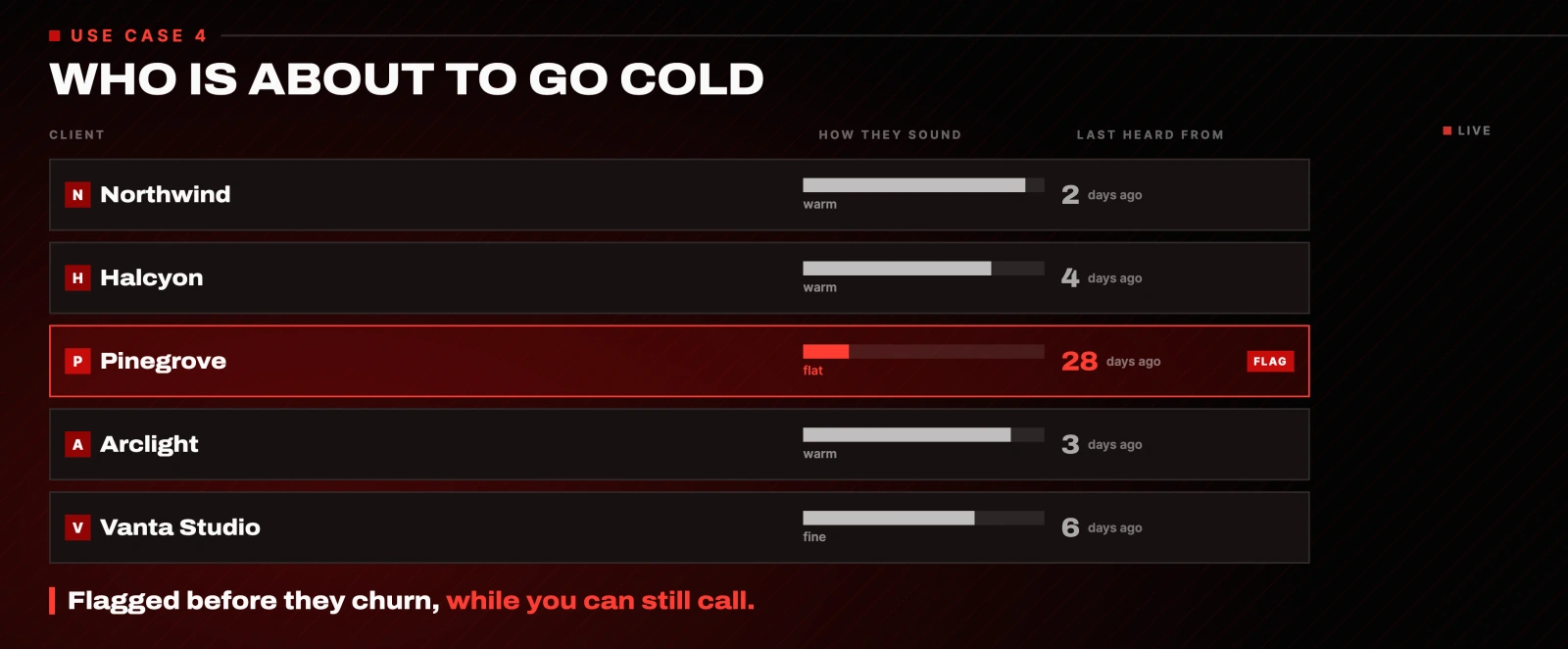
The setup is a Telegram bot added to all of our client groups, which is how it sees every client chat. Once that is running:
Once a day, review every client conversation across Telegram. Flag anyone
who has gone quiet, hasn't been contacted in 14 days, or sounds unhappy,
and send me a short morning list of who to check in on first and why.
Don't message any client yourself.
The catch: this is a radar, not a replacement. It tells you who to call. You still make the call, especially for anything sensitive.
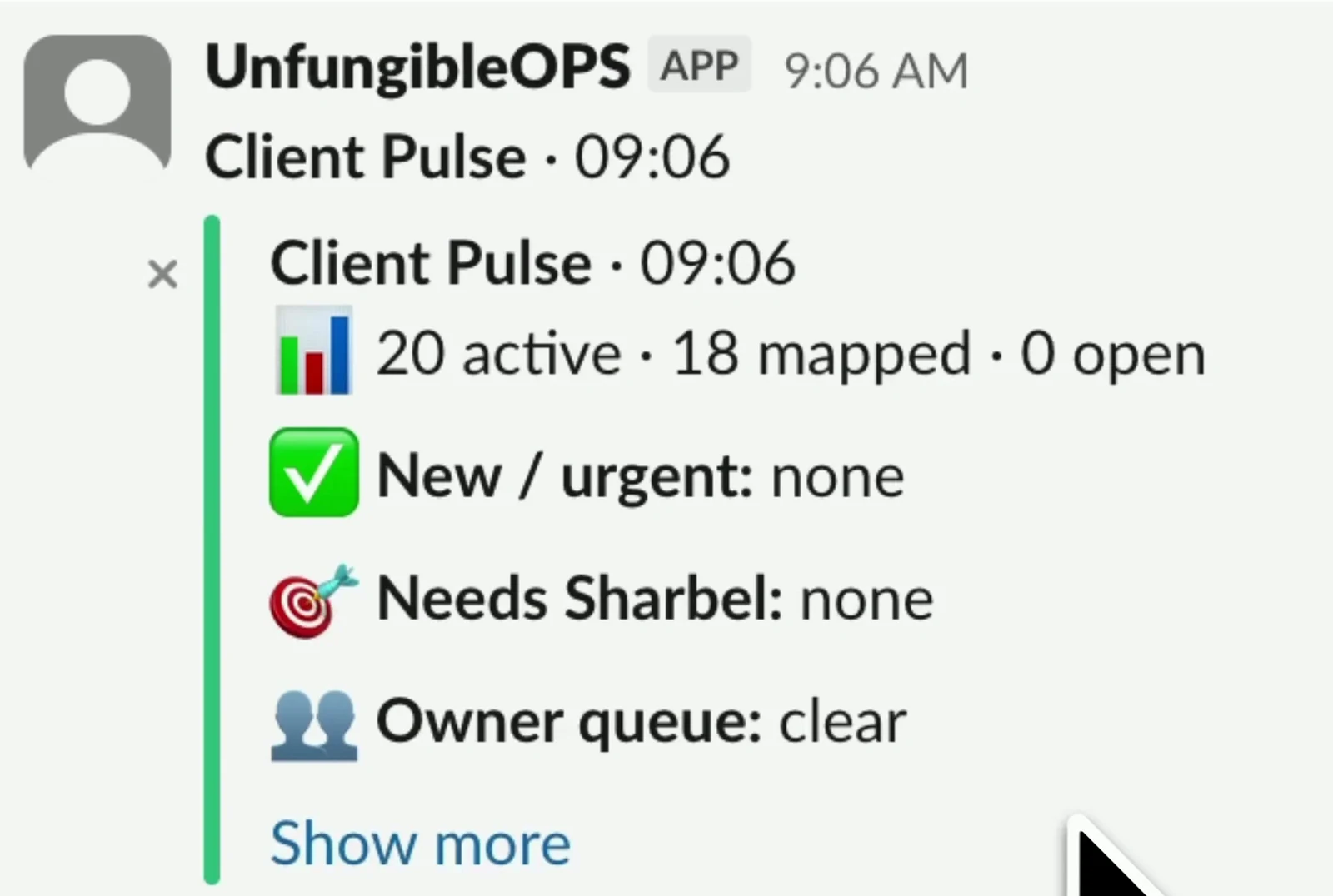
The daily summary lands in Slack looking like this:
5. Give every tool one shared memory
This is the one that quietly ties the rest together.
Those four jobs are not four separate bots. They are one assistant with one memory behind all of them. When it drafts a reply in my inbox it already knows what got decided in this morning's meeting. When it flags a client gone quiet it remembers the last few things we actually talked about.
The hack is carrying that same brain across your other tools. If you use Claude Code or GPT separately, you can plug them into one shared memory store. I stop starting from zero every time I switch tools. I am not re-explaining my business, my clients or my preferences to Claude Code before asking it to edit a site. It just knows.
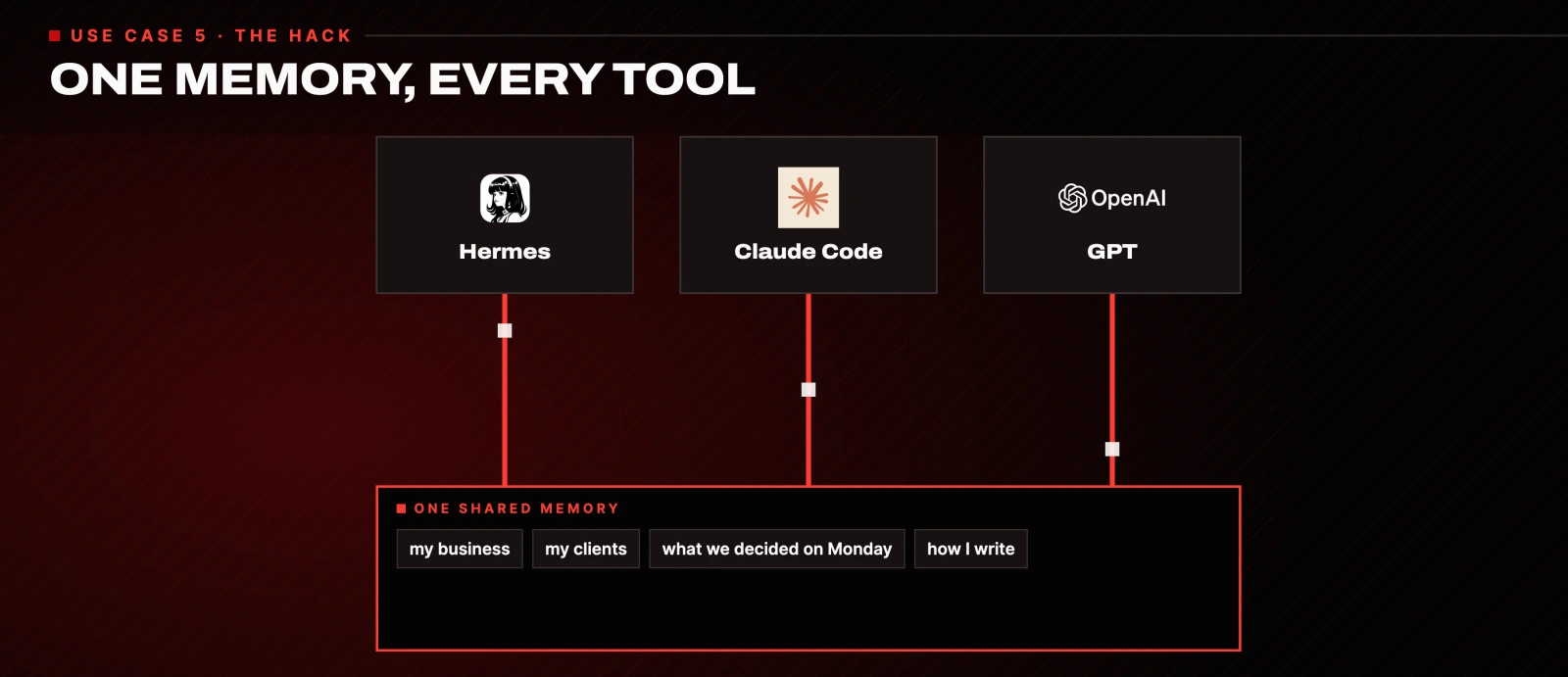
I use mem0. It is free under 10,000 saves and 1,000 lookups a month, which covers most single-person setups. The alternatives:
- Supermemory is fast and cloud-based.
- Zep tracks how facts about you change over time, so it knows what is still true and what is not.
- Letta is more than memory. It is a whole agent framework with the memory baked in.
Installing is a sentence:
I want to install mem0. Do it for me.To share that memory with Claude Code, add it as an MCP server. The fastest route is inside Claude Code itself: + → Connectors → Browse connectors, then search for your provider. Or add it from the terminal following your provider's own snippet, which for mem0 is in the mem0 docs.
The catch: most memory providers are paid once you are past the free tier. If you have a machine you can leave on, run mem0 locally with a local model and it costs nothing.
6. Run your desk from your phone
The most underrated one by a mile. You can just text it.
Mine is plugged into a Mac mini at home, so my entire desk, every file, every tool, every login, is sitting there ready at any time from anywhere in the world.
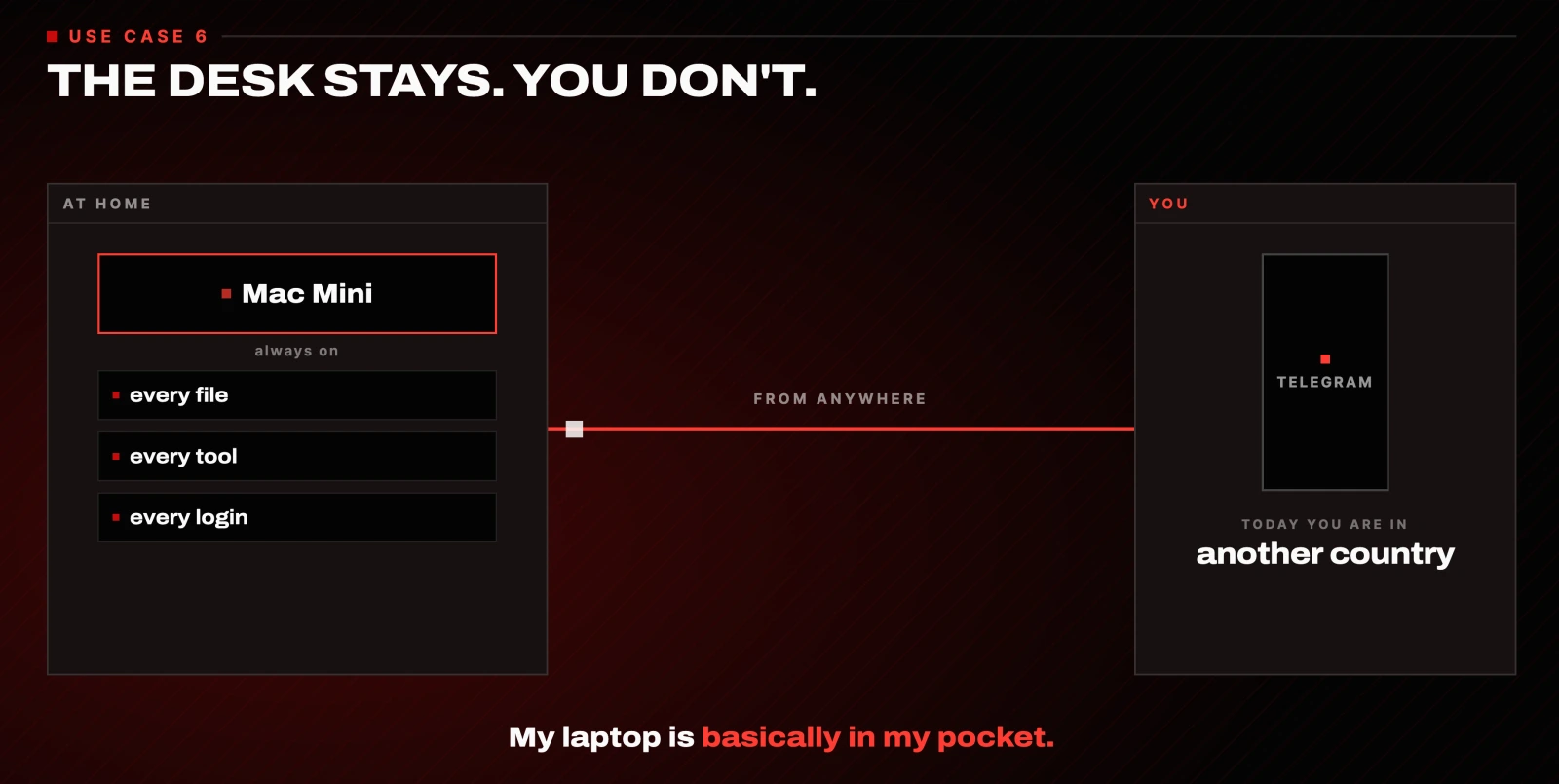
I am a bit of a workaholic, so every time I travelled I used to get the itch. I wish I had my laptop. I need to send that email. I want that file. Now I pull out my phone, send a voice note to Hermes on Telegram, and it takes over my desk and does it. My laptop is basically in my pocket.
There is no prompt for this one. It is a property of running the agent on a machine that stays on, with Telegram connected. Set that up once and the phone part is free.
7. Wake up to a morning brief
The one I genuinely cannot imagine going back from.
You sleep. It does not. Every night it works, and the first message I get when I wake up is one question: what is your number one priority today? I am still in bed with a coffee, so I send a voice note back. Today the main thing is this. By the time I actually sit down at my desk, sometimes it is already done.
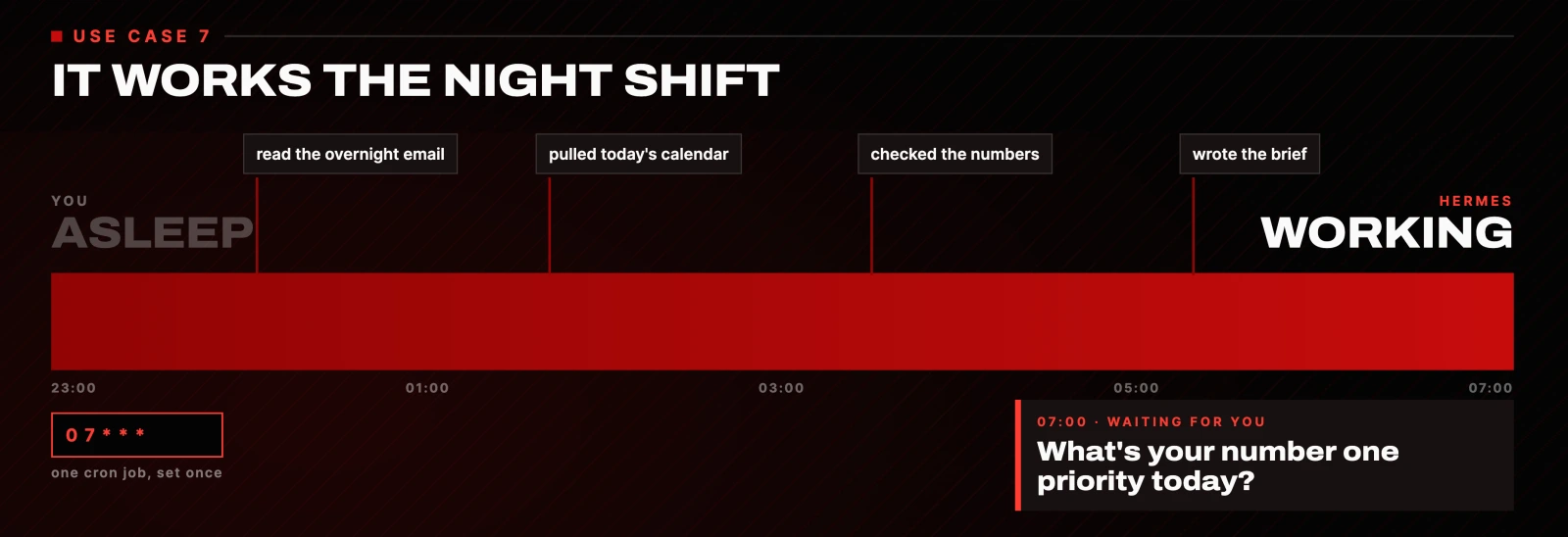
This is the easiest one to set up. One message, once:
Every morning at 7am, send me a Telegram message with today's calendar,
the overnight emails that matter, and my key numbers. Then ask me my
number one priority. When I reply, start working on it and get as far as
you safely can before I sit down, without spending money or sending
anything externally without asking first.
From that moment on it asks every single morning.
Is Hermes Agent worth setting up?
Once you stop using AI like a chatbot and start handing it real jobs, you do not go back. A chatbot saves you a few minutes. This gives you back your day.

Hermes is free and open source, so the only thing between you and all of this is about one afternoon of setup. Start with job seven, the morning brief. It is the smallest one to wire up and it is the one you will feel the next day.
Two rules worth keeping as you add the rest:
- Anything that talks to another human stays in drafts. Email, client messages, replies. You approve.
- Anything that spends money stops at the checkout. Let it do the work, you click the last button.
Every tool in this setup
- Hermes Agent: free, open source, MIT. GitHub · Docs
- Fireflies: meeting transcripts, job 1
- Notion: the task board, job 1
- Telegram: alerts, client groups and the phone control, jobs 3, 4, 6, 7
- mem0: shared memory, free under 10k saves and 1k lookups. Docs
- Supermemory · Zep · Letta: the memory alternatives
- Claude Code: the second tool I share memory with
Every prompt on this page is copy-pasteable as it is. If you would rather not wire them up by hand, send this whole article to Hermes and ask it to set the seven jobs up for you. It will know what to do.
Questions
- What is Hermes Agent?
- Hermes Agent is a free, open-source AI agent from Nous Research, released under the MIT licence. It runs on your own machine rather than in a browser tab, so it can hold a job on a schedule and act without you prompting it each time. That is the difference between it and a chatbot: a chatbot answers when asked, an agent keeps working when you close the laptop.
- Is Hermes Agent free?
- Yes. Hermes itself is free and open source, and you install it with a single command. The only costs in the setup on this page are optional: the shared memory providers charge past a free tier, and mem0 is free under 10,000 saves and 1,000 lookups a month. Run mem0 locally with a local model and that cost disappears too.
- What can you actually use an AI agent for?
- The seven jobs on this page are the ones that stuck: turning meeting transcripts into assigned tasks, triaging an inbox and drafting replies, monitoring a site or a page around the clock, flagging clients who have gone quiet, sharing one memory across every tool, running your desk from your phone, and a morning brief that starts work before you sit down. Each is a single prompt.
- Does Hermes Agent work on Windows?
- Yes. There is a native Windows install through PowerShell where the CLI, gateway, TUI and tools all run without WSL. The one-line curl installer also works inside WSL2 if you prefer that. The docs cover both paths.
- Can an AI agent send emails on its own?
- It can, and you should not let it. Keep the inbox job on drafts and approve each one yourself. An agent that hallucinates your rates and sends a lead the wrong number costs more than the time it saves. The same rule applies to anything that spends money: let it work up to the checkout, then approve the final click yourself.

You made it to the end
That is the whole build. Want the next one?
Read next
How to Make Hermes Agent More Reliable (Without Adding More Tools)
More tools made my agent worse. Fixing the trust line is what let it run without me.
How to Build a Team of AI Agents That Actually Work Together
One agent does a task. A team splits the work, checks itself and runs while you sleep. Here is the exact setup.
OpenAI Dots: What It Actually Does, What It Costs, and Whether It's Worth It
An honest review from someone who has run always-on agents for a year, including the Pro plan cut OpenAI made the same day.