What Is Jev? 10 Real Ways to Use TypeSafe's System One Model
Jev does not write or reason. It decides in 200 milliseconds, and that makes it the cheapest layer you can put in front of Claude or GPT.
From the videoI Tested Jev's 10 Best Use Cases. It's Not What They Told You.
Jev is a System One model from TypeSafe AI. It does not write, chat or reason. You hand it text and a typed question, and about 200 milliseconds later it hands back a yes/no, a pick from your list, or a score, each with a confidence number. It is not a better Claude or GPT. It is a cheap, fast decision layer you put in front of them.
I tested the ten things I would actually use it for, and the places I would not. Here is what held up.
What Jev actually is
The useful way to think about it is fast brain versus slow brain.
Your slow brain is the one that sits and reasons through a problem. That is Claude, that is GPT, that is every model you have used. They think, they write, then they explain.
Jev is your fast brain. The part that looks at a shirt and just knows it is blue. You do not deliberate about the colour, you arrive at it.
That difference is the whole product. Up to now models have raced to be the smartest, and the smarter a model gets, the longer it takes on a simple call. Ask a frontier model to make thousands of tiny decisions and you wait, and you pay for every word it thinks on the way.

Jev cannot ramble and it cannot hallucinate a broken format. TypeSafe publishes workflow evals putting it at 67.8% mean accuracy across four tasks at $0.0004 per case, which is the same accuracy as Claude Sonnet 5 at $0.1174. That is 294 times cheaper for the same result, and 0.4 seconds against 78.

The three questions you can ask it
Everything below is built out of three primitives. A Noul is a yes/no, returned as a probability. A Choice picks one option from a set you define. A Score rates against ordered levels you write. Choice and Score also return confidence, which is what lets your code decide whether to act at all.

You can mix all three in a single call, and that is the whole trick: one request, many questions, answered in parallel.
curl -X POST https://api.typesafe.ai/v1/systemone \
  -H "Authorization: Bearer $TYPESAFE_API_KEY" \
  -H "Content-Type: application/json" \
  -d @- <<'EOF'
{
  "state": "Hi, I saw your channel and wanted to discuss a paid partnership for our Series B launch. Budget is flexible. Can we jump on a call this week?",
  "model": "jev-latest",
  "questions": {
    "bucket": {
      "type": "choice",
      "instructions": "What kind of email is this",
      "criteria": {
        "receipt": "A receipt, invoice or order confirmation",
        "brand_deal": "A sponsorship or paid partnership offer",
        "scam": "Spam, phishing or a bad-faith pitch"
      }
    },
    "fit": {
      "type": "score",
      "instructions": "How good a fit this is for a paid AI content partnership",
      "criteria": [
        "Not a fit at all",
        "Possible, needs a human look",
        "Strong fit, reply today"
      ]
    },
    "is_urgent": {
      "type": "noul",
      "instructions": "The sender is asking for a response this week"
    }
  }
}
EOF
The answer comes back typed, with the probability spread for every option, so you branch on it in code instead of parsing prose.
{
  "answers": {
    "bucket": {
      "type": "choice",
      "choice": "brand_deal",
      "confidence": 0.78,
      "probabilities": { "brand_deal": 0.85, "scam": 0.15, "receipt": 0.0 }
    },
    "fit":       { "type": "score", "score": 2.0, "confidence": 1.0 },
    "is_urgent": { "type": "noul",  "noul": 1.0 }
  },
  "usage": { "input_tokens": 392, "output_tokens": 65 }
}
The 10 ways to use Jev
1. Triage any pile you do not want to read
Point it at a stack of text and ask several questions at once. I gave it my inbox and asked three: is this a receipt, is this a brand deal, is this a scam.

297 emails, 4.3 seconds, 323 milliseconds per decision, $0.0069 for the run. The same shape works on support tickets, DMs and comments.
2. Filter your feed in real time
Because it decides fast enough to run as a page loads, you can tag every post before you see it and sort into breaking news, real signal, or slop. Someone open-sourced exactly this: the Jev AI slop detector flags AI-written posts on X, Reddit and LinkedIn as you scroll, and you can invert it and show only the slop if you want to see what it caught.
3. Score every lead the second it lands
A lead fills in a form. Jev scores the fit, picks the reply template, and your code sends it. Three out of three gets the call link, zero out of three gets a polite no, spam gets nothing at all. In the test it made that decision in about 300 milliseconds.
from typesafe_sdk import Choice, Score, TypeSafeClient

client = TypeSafeClient()

response = client.system_one(
    state=lead_form_text,
    questions={
        "fit": Score(
            instructions="How well this lead fits an AI build engagement",
            criteria=["No fit", "Worth a look", "Strong fit"],
        ),
        "template": Choice(
            instructions="Which reply template to send",
            criteria={
                "A": "Strong fit in the AI niche, offer a scoping call",
                "B": "Marketing enquiry, send the rate card",
                "D": "Not a fit, send a polite decline",
                "none": "Spam, do not reply",
            },
        ),
    },
)

answer = response.answers["template"]
if answer.confidence > 0.7 and answer.choice != "none":
    send(template=answer.choice)
4. Give a browser agent its next move
Drop it inside an agent as the thing that picks the next click. Someone built a flight booker on browser-use where Jev reads the page and chooses the next action every step, and it booked a flight in about seven seconds. A normal model is slow here because it thinks out loud on every click. Jev just moves.
5. A text box that becomes what you type
One input. As you type, Jev works out what you mean and the box turns into the right control. Type a date and you get a date picker. Type a colour and you get a swatch. It happens on every keystroke, which is only possible because the decision is that cheap.
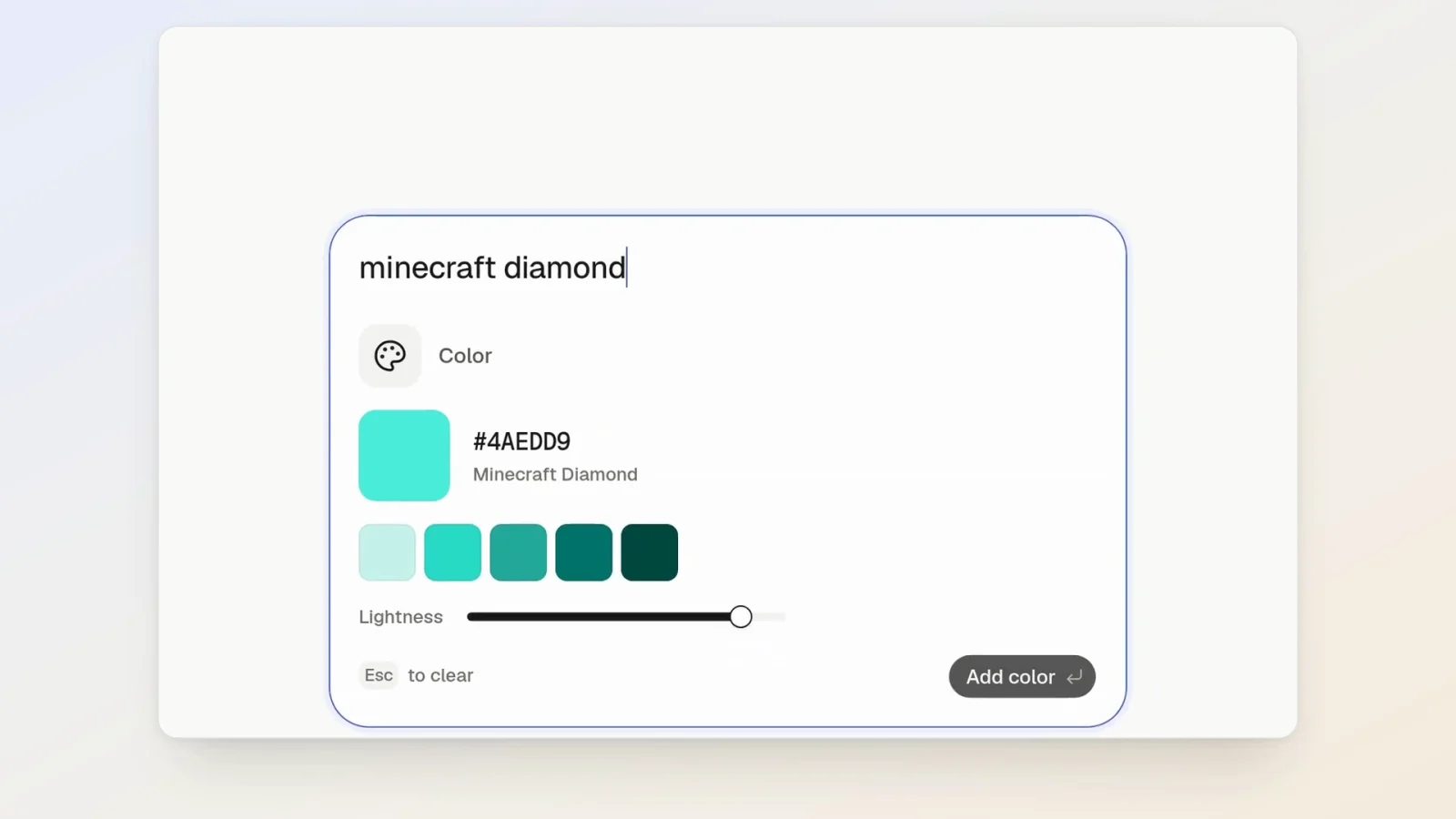
This is shapeshift, and it is the clearest example of an interface you could not build before.
6. Site search that understands the question
Instead of making users guess your keywords, take the keyword hits first and have Jev re-rank them by what the person actually meant. Previously this needed an embeddings pipeline and a vector database, which is expensive and annoying to keep fresh. This skips all of it. jevsearch is a drop-in React component, and there is a live playground.
7. Put a bouncer in front of your agent
This is the one that changed my bill. I have an automation where Claude fetches the day's AI news. Left alone it casts a wide net, pulls everything that might be relevant, and reads all of it.
Wire Jev in front as the thing that decides what Claude ever sees, and it scans each source first: is this safe, is this useful, are we on goal.
In the test it scraped 173 items and handed 33 to Claude. Tokens went from 29,208 to 6,423, which is 78 percent fewer, and the run cost dropped from $0.0797 to $0.0397. The Jev pass itself cost $0.0056 for all 173 checks. The junk gets caught at the door before the expensive model ever sees it.
8. Tear apart every ad in your niche
Feed it a stack of competitor ad copy and ask the same questions of each: what is the offer, what is the angle, what is the selling point, is it leaning on urgency or fear or a discount. A couple of seconds later you have a map of what your whole market is running.
9. Screen a stack of applicants
Same shape, higher stakes. Hand it every applicant and your criteria, and it scores each one and cites the lines that earned the score. One company put it in front of their recruiting search and went from minutes to seconds. You are not letting it hire. You are letting it hand you the shortlist faster.
10. The traffic cop, which is really all of the above
Put Jev in front of your whole stack. Everything that comes in gets looked at once and sent somewhere: cheap work to your automations, questions to the thinking models, anything important straight to you.

You stop paying a frontier model to read your spam, and you spend the real money only on the things that need a brain.
Where Jev breaks
Jev is dumb on purpose, and the hype skips this part.
It lost at checkers against me without me trying, because it makes a snap call every move and forgets the one before. There is no plan.

It has a 32,000 token context window, a fraction of what Claude or GPT hand you.

And the answers are not guaranteed right. The format is locked, but the content is a fast guess with a confidence score attached. Test it before you trust it, and gate on confidence rather than assuming.
Three things not to do with it. The single most popular Jev demo online uses it to compact Claude's context. That post has more than ten thousand likes and it is one of the worst uses of the model, because Jev does not have the reasoning or the window to compact well. Same for using it to judge another model's answers, and same for writing text one letter at a time. You can do all three. They are all bad ideas.
Where this lands
Jev is not a better model than Claude or GPT and it is not trying to be. It is the cheap, fast layer that goes in front of them.

If you are building anything that makes a small decision thousands of times, put Jev there and save the expensive models for the actual thinking. It is not the model that replaces your AI. It is the model that stops your AI burning money where it is not needed.
How to start in ten minutes
Paste any text into the playground and add one Noul question. That is the fastest way to feel what it does.
Then get a key from the dashboard and install the SDK:
pip install typesafe-sdkIf you work in a coding agent, TypeSafe ships a skill so the agent knows how to write these calls:
claude plugin marketplace add typesafe-ai/skills
claude plugin install typesafe@typesafe-ai
For any other agent:
npx skills add typesafe-ai/skills --skill typesafe-aiStart with the pile you least want to read. That one pays for itself the same day.
Resources
Questions
- What is Jev?
- Jev is a System One model from TypeSafe AI. Instead of generating text, it evaluates typed questions against whatever state you send it and returns a yes/no probability, a pick from a list you define, or a score against levels you write. Every Choice and Score answer carries a confidence number, so your code can decide whether to act on it.
- Is Jev better than Claude or GPT?
- No, and it is not trying to be. It cannot write, hold a conversation or reason through a problem. It is a decision layer you put in front of those models so they only see the work that actually needs them.
- How fast and how cheap is Jev?
- It answers in roughly 200 milliseconds and its output tokens are free. On TypeSafe's published workflow evals it hits the same mean accuracy as Claude Sonnet 5, 67.8%, at $0.0004 per case against $0.1174, which is 294 times cheaper.
- What should you not use Jev for?
- Do not use it to compact an agent's context, to judge another model's answers, or to write text. It has a 32,000 token window and makes a snap call with no memory of the last one. The most popular Jev demo online does exactly the first of these, and it is a bad idea.
- How do you start using Jev?
- Paste text into TypeSafe's playground and add one Noul question. Then get an API key, install the Python SDK with pip install typesafe-sdk, and POST state plus typed questions to https://api.typesafe.ai/v1/systemone.

You made it to the end
That is the whole build. Want the next one?
Read next
How to Build an Agent Skill That Actually Fires
I measured the 55 most popular skills on GitHub. Half of them never tell your agent when to run, and they charge you tokens on every message anyway.
How to Build a Team of AI Agents That Actually Work Together
One agent does a task. A team splits the work, checks itself and runs while you sleep. Here is the exact setup.
How to Give Claude Code and Your AI Agent Shared Memory
Connect a builder and an operator to one memory store, so what you tell one the other already knows.