The 10 Best Hermes Agent Skills to Install, With Commands
Ten free skills that give Hermes Agent things it can't do alone, each with the install command and the prompt I tested it with.
From the video10 New Hermes Agent Skills You Need To Install This Week
The 10 best Hermes Agent skills right now are Ponytail, Planning With Files, I Have ADHD, Gbrain, Agent Reach, Hyperframes, Taste Skill, Cybersecurity Skills, Scientific Agent Skills and Diagram Design. All ten are free, and most install with one command. Each one fixes a specific thing Hermes Agent can't do on its own.
I run all ten on my own agent. Below is the countdown from 10 to 1, with the exact install command for each, the prompt I ran to test it, and what came back. If you just want everything at once, skip to Install all 10 in one go.
| # | Skill | What it fixes | Install type |
|---|---|---|---|
| 10 | Diagram Design | Ugly box-and-arrow diagrams | Skill |
| 9 | Scientific Agent Skills | Confident guesses about data | Built-in tap |
| 8 | Cybersecurity Skills | Holes nobody checks for | Skill pack |
| 7 | Taste Skill | Generic, flat AI interfaces | Skill |
| 6 | Hyperframes | Agents that can't make video | Skill + CLI |
| 5 | Agent Reach | Blind on gated platforms | CLI + skill |
| 4 | Gbrain | Forgetting everything between chats | MCP server |
| 3 | I Have ADHD | Five paragraphs for a one-line answer | Skill |
| 2 | Planning With Files | Losing the plan on long jobs | Skill + plugin |
| 1 | Ponytail | Over-engineering every task | Plugin |
How to install a skill in Hermes Agent
Hermes keeps skills in ~/.hermes/skills/ and plugins in ~/.hermes/plugins/. There are two ways in, and the Hermes skills docs cover both.
The native one installs from GitHub with a security scan:
hermes skills install owner/repo/path/to/skillFor repos that only document the cross-agent skills CLI, point it at Hermes with -a hermes-agent -g. Without that flag it installs to whatever agents you tick in its picker, and Hermes does not read those folders by default.
npx skills add owner/repo -a hermes-agent -gPlugins are off until you enable them (plugin docs). Restart Hermes or start a new session after any install.
10. Diagram Design: diagrams that look designed
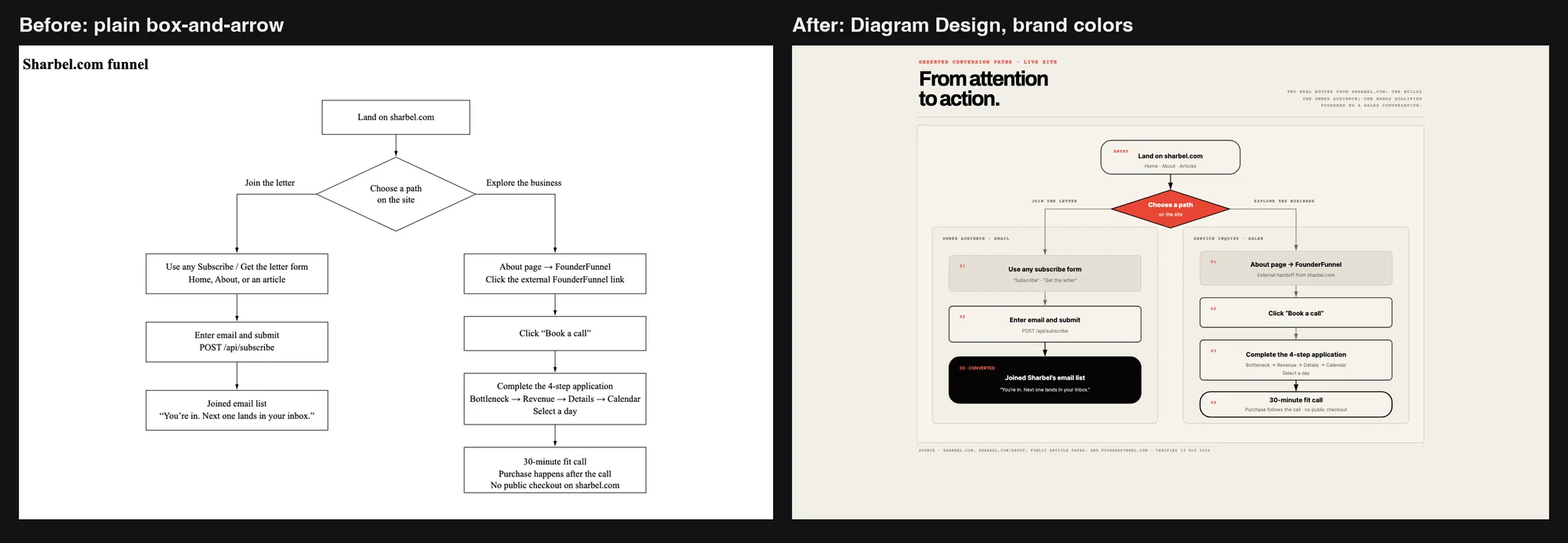
Ask your agent for a diagram and you usually get a grey box-and-arrow mess nobody wants to look at. Diagram Design gives it an editorial eye: clean flowcharts, architecture diagrams and explainers that look like a designer made them. If you make professional decks or teach anything technical, this one goes straight into your workflow.
I took my newsletter funnel as one of those plain grey diagrams and asked Hermes to redraw it with this skill, in my brand colors.
npx skills add cathrynlavery/diagram-design -a hermes-agent -gUse the diagram-design skill to redraw this diagram in my brand colors.
Keep every step and label, just make it look like a designer made it.
[paste your diagram, Mermaid code, or a description of the flow]9. Scientific Agent Skills: research that holds up
Ask your agent to dig through a dataset or check a claim, and most of the time it makes something up that sounds right. Scientific Agent Skills is a library of 177 research skills built for rigor: real data analysis and proper statistical methods. It's for students, researchers, and anyone who works with data all day.
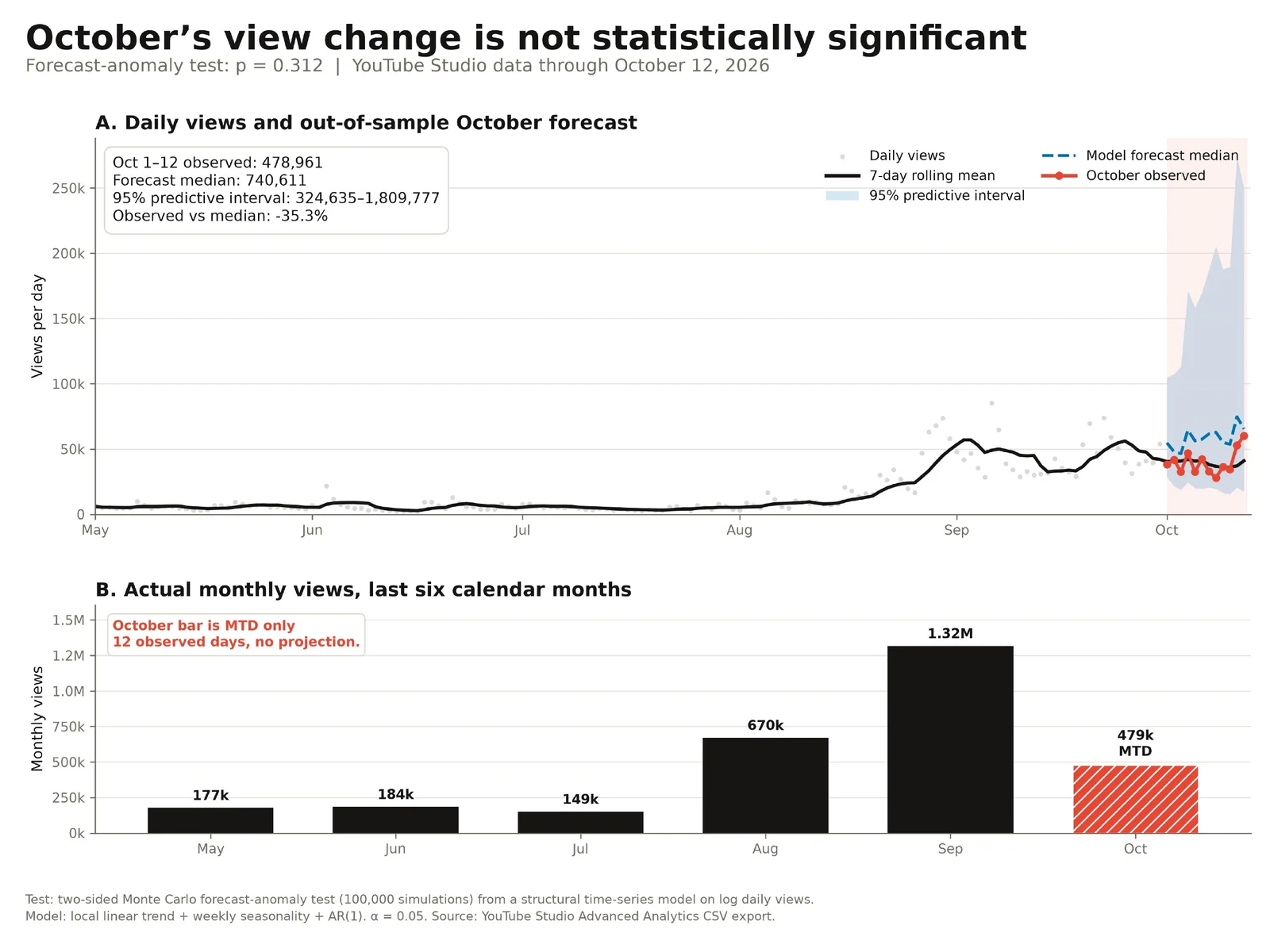
I handed it a CSV of my real daily video views and asked whether this month's growth was statistically real or just noise. It ran a proper test and gave me back a publication-quality chart with the p-value. The answer was not what I wanted to hear: the change was not statistically significant. That is the point. A confident guess would have told me what I wanted.
On current Hermes builds this repo ships as a default tap, so there is nothing to add. Search it and install what you need:
hermes skills search statisticsOn an older Hermes build without it, add the tap first. This is the repo's own documented command:
hermes skills tap add K-Dense-AI/scientific-agent-skillsHere's a CSV of my daily video views. Is this month's growth statistically
real, or just noise? Run a proper statistical test, tell me which one and why,
and give me a publication-quality chart with the result and the p-value.The repo's own advice is not to install all 177 at once. Many skills need uv and their own dependencies or API keys.
8. Cybersecurity Skills: audit your app like an attacker
Code ships with holes in it, and nobody ever goes back to check. Cybersecurity Skills is a pack of 800+ security skills (818 skill folders when I counted) mapped to real security playbooks. Your agent uses them to go through your app the way an attacker would, find the weak spots and tell you how to close each one. If you ship apps, run a SaaS, or have anything with a login live on the internet, this is a free security pass.
Quick disclaimer: the name says Anthropic, but it is a community pack. It is not an official Anthropic plugin. The creator just added Anthropic to the name.
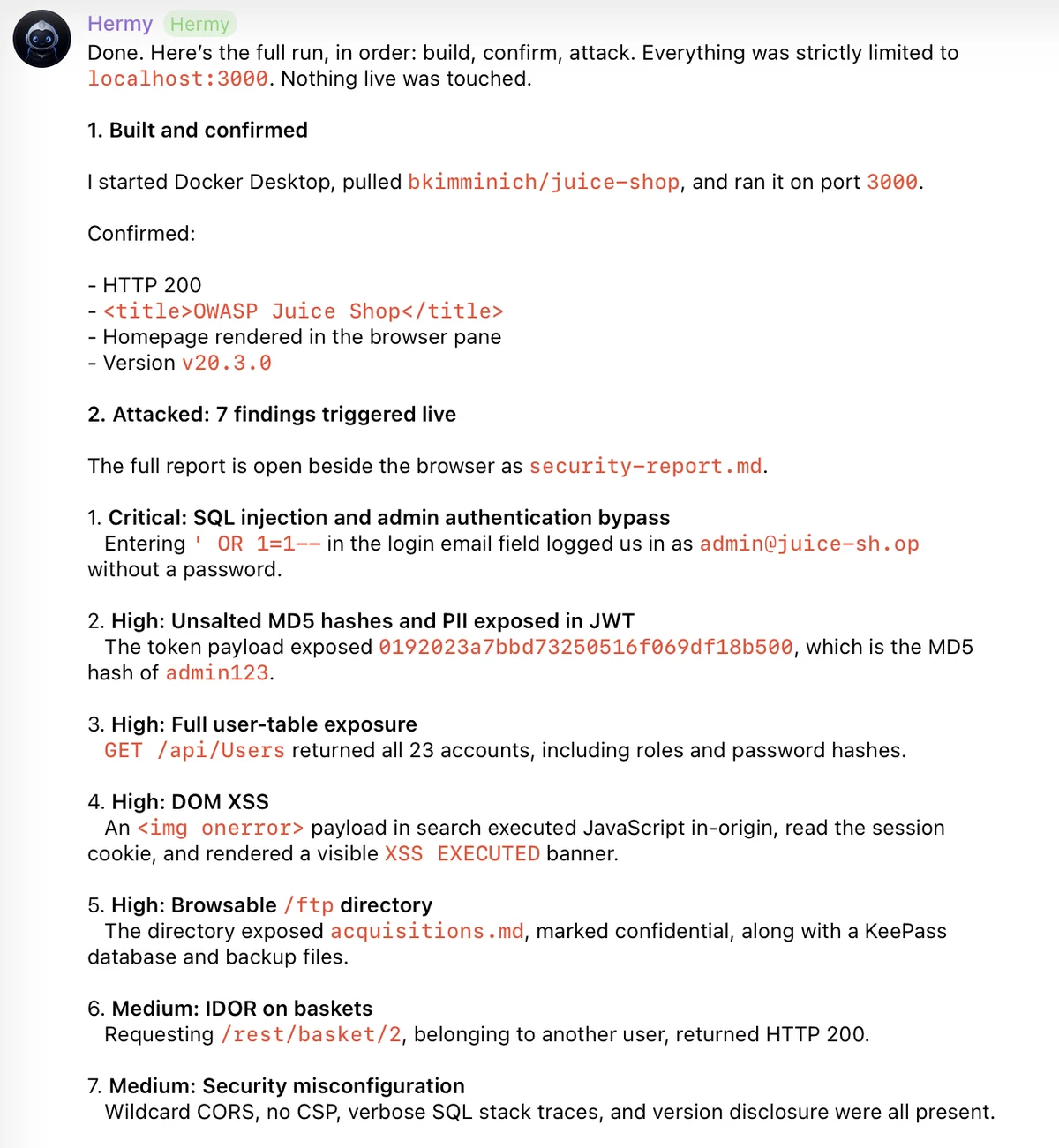
I pointed it at a deliberately vulnerable practice app running on my own machine, OWASP Juice Shop. It came back with a ranked list of seven findings, starting with a critical SQL injection that bypassed the admin login, each with how to patch it.
npx skills add mukul975/Anthropic-Cybersecurity-Skills -a hermes-agent -gTo practise on a safe target first, run Juice Shop locally with Docker:
docker run -p 3000:3000 bkimminich/juice-shopUse your web app security skills to test http://localhost:3000 the way an
attacker would. Stay on localhost only. Rank what you find by severity and
tell me exactly how to patch each one.Only point it at things you own. These are playbooks, so the agent runs real tools against the target.
7. Taste Skill: interfaces that don't look AI-made
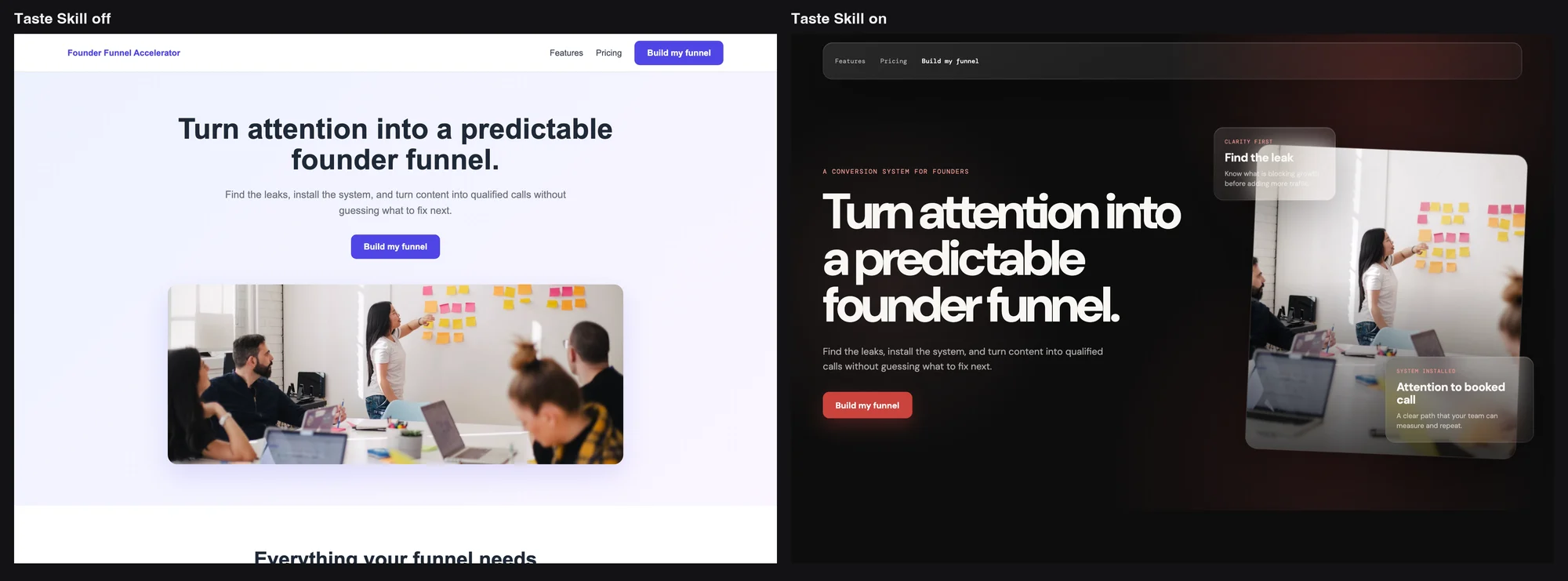
AI-built interfaces work, but you can spot them from a mile away: off spacing, flat sections, that generic look. Taste Skill gives your agent design rules for spacing, type, layout and motion, then has it go back over what it built and fix the hundred little things that scream "generated". It's the difference between a site that looks like a side project and one that looks funded.
I had Hermes build a landing page with the skill off. Generic and boxy, the usual. Then I turned Taste Skill on and had it redesign the exact same page with the same content.
npx skills add https://github.com/Leonxlnx/taste-skill --skill "design-taste-frontend" -a hermes-agent -gRedesign this landing page using the taste skill. Keep every word of the
content the same. Fix the spacing, type, layout and motion so it doesn't look
AI-generated.It needs Node 22+ and Chrome, Edge or Chromium installed. No API keys.
6. Hyperframes: your agent makes real videos
Your agent can write about a video all day. It just can't make one. Hyperframes changes that: you describe what you want, it writes the whole thing out as an HTML file, then renders it into an actual video. It's built for agents from the ground up. If you make content, run ads, or have been meaning to start posting but animation stops you, this removes that excuse.
I gave it one line, and it wrote the video as code and rendered a real MP4. The clip in the video above is exactly what it handed back.
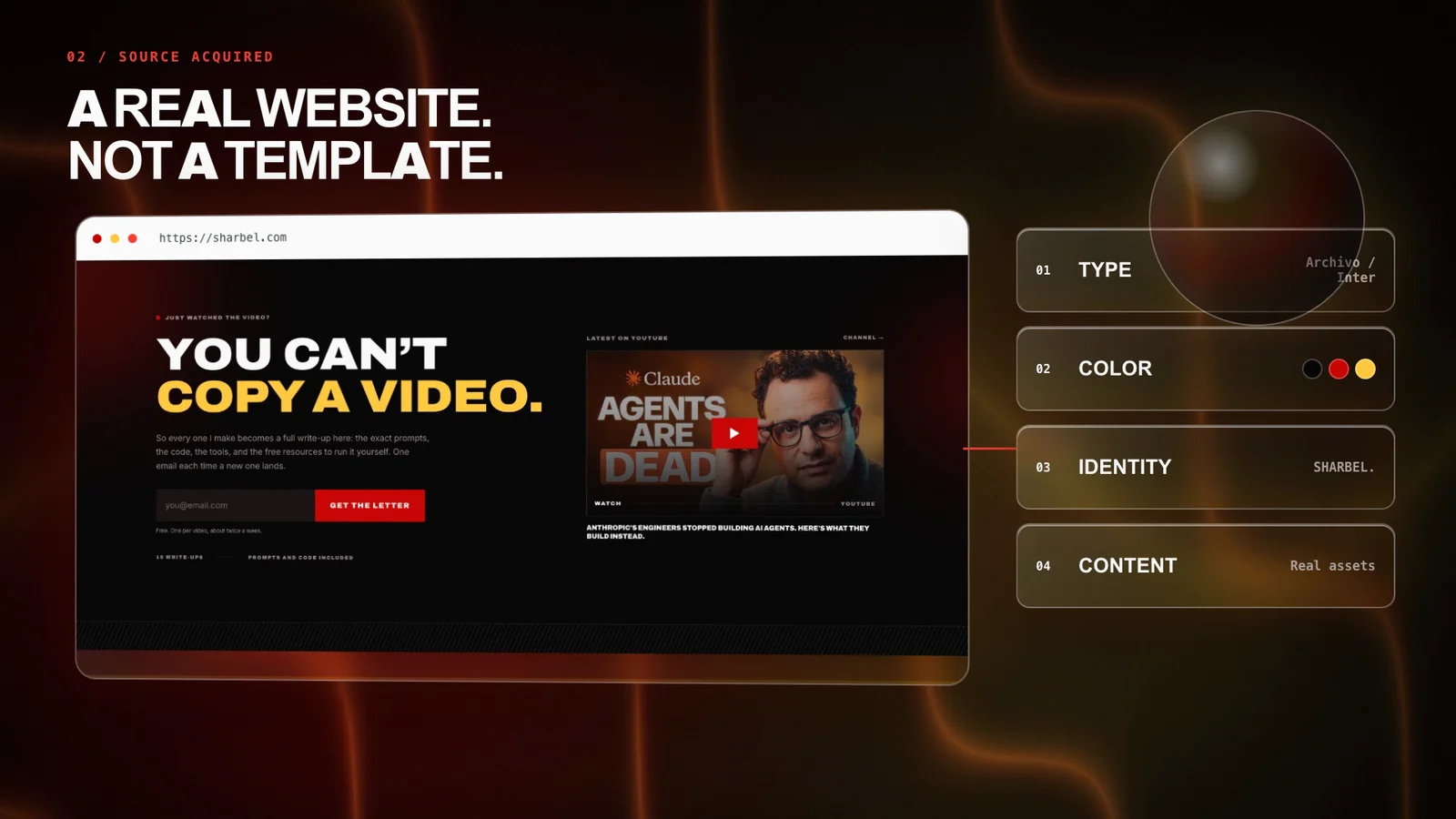
npx skills add heygen-com/hyperframes -a hermes-agent -gPick Core Skills in the picker; the /hyperframes router installs the rest on demand. It needs Node 22+ and FFmpeg. A local render needs no HeyGen key.
Make me a 10-second product intro for my website, sharbel.com, with a title
that fades in.5. Agent Reach: eyes on X, Reddit and GitHub
Your agent can search the open web, but the second a page needs a login, it's blind. Agent Reach hands it the keys: it pulls from gated platforms like X, Reddit and GitHub, with failover routes so it doesn't get blocked. It's for research, marketing and competitor digging. I covered it in a previous video and brought it back because it keeps getting better.
I asked it to find what people are actually saying about Agent Reach itself. It came back with real quotes, real links and a clean summary.
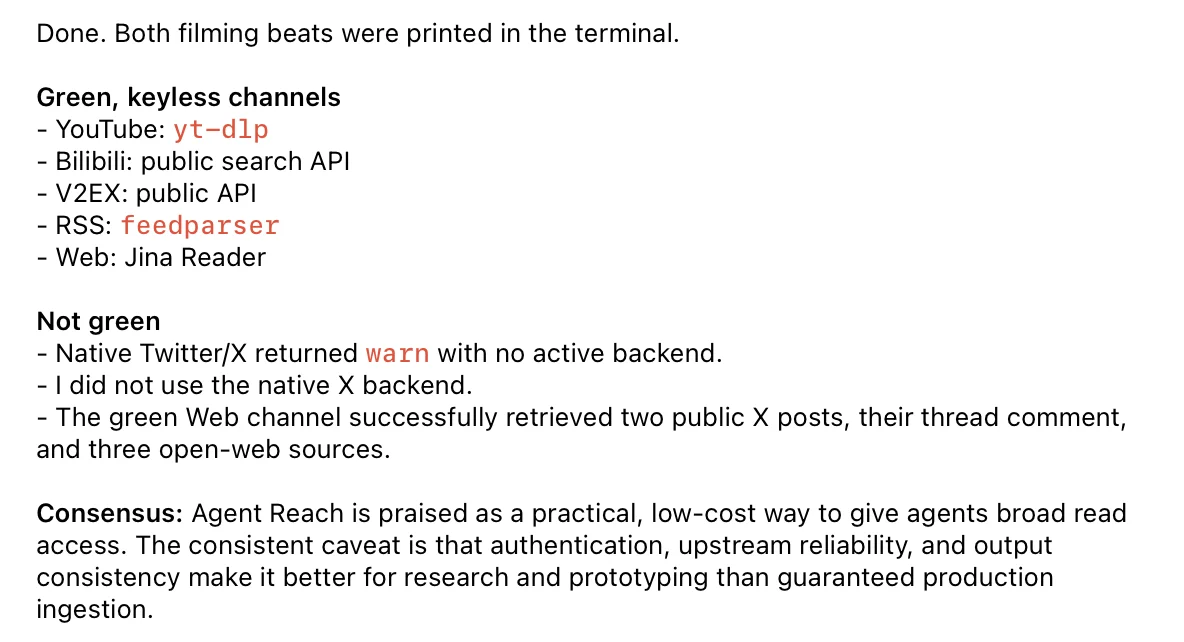
One real-world note from that run: the native X backend was not green, because X needs a logged-in session. Agent Reach fell back to its keyless web channel and still pulled public X posts. Run agent-reach doctor first to see what each channel can reach.
The fastest route is to hand your agent the repo's own install guide:
Install Agent Reach: https://raw.githubusercontent.com/Panniantong/agent-reach/main/docs/install.mdOr by hand. It needs Python 3.10+. Its own skill installer skips ~/.hermes, so install the skill with the skills CLI:
pipx install https://github.com/Panniantong/agent-reach/archive/main.zip
agent-reach install --env=auto
npx skills add Panniantong/Agent-Reach@agent-reach -a hermes-agent -g
agent-reach doctorGo see what people are actually saying about [topic] across X, Reddit and the
open web. Give me real quotes with links, then a short summary of the consensus.4. Gbrain: a second brain you actually own
Your agent forgets. Every new chat starts from zero, and whatever you taught it last week is gone. Gbrain gives it a real second brain that lives on your own machine. It stores everything as a connected map, so instead of just matching keywords it understands how your notes link together. It works with Hermes natively; Garry Tan built it to run his own agents.
I pointed it at everything I've written, all my notes and docs. Now I can ask about something buried across a dozen files and it answers with the exact sources instead of guessing.
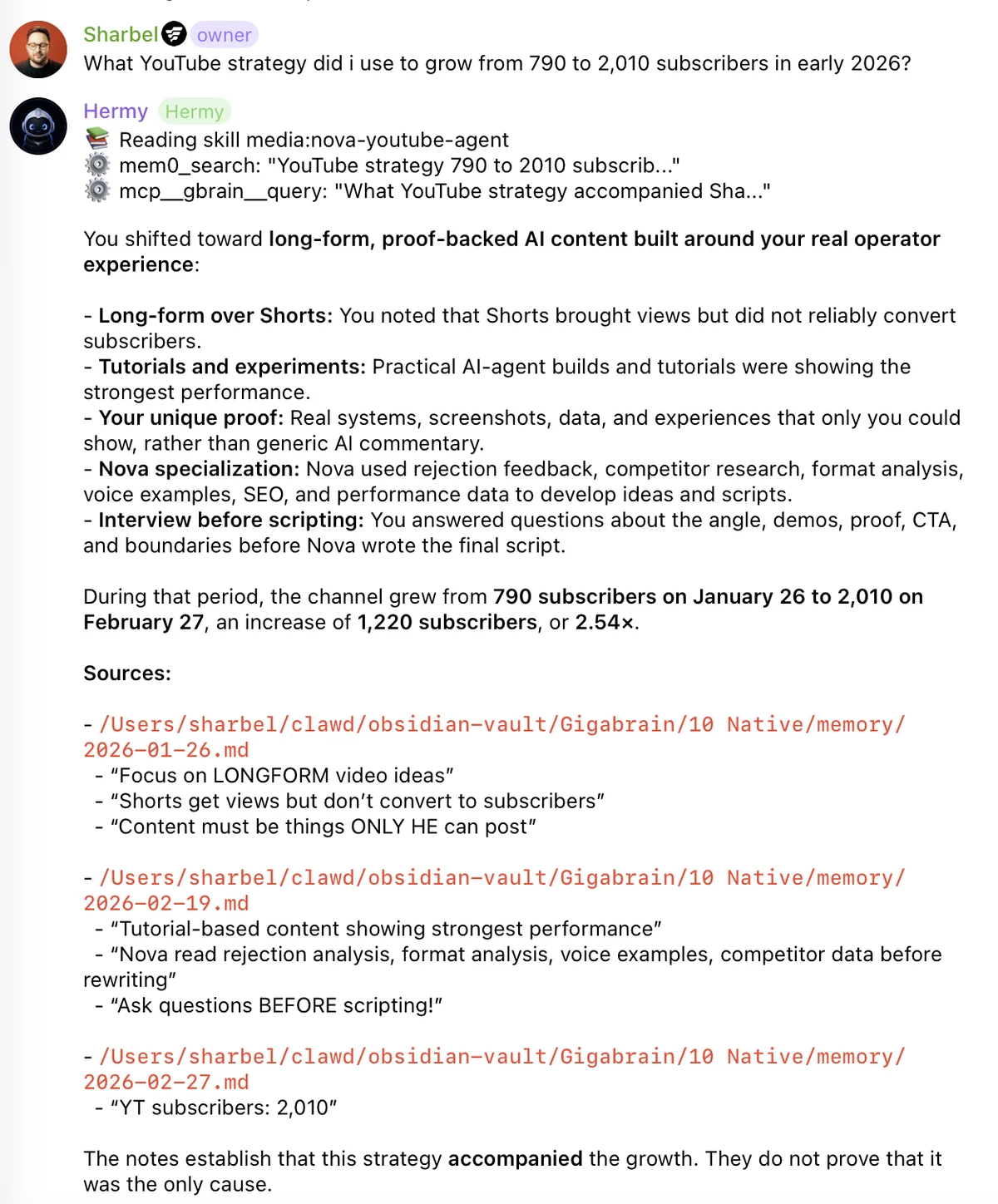
It works alongside the tools you already use. Point it at your Obsidian vault or any folder of markdown.
The easy way is to let Hermes run the official installer:
Retrieve and follow the instructions at:
https://raw.githubusercontent.com/garrytan/gbrain/master/INSTALL_FOR_AGENTS.md
Or by hand. It needs Bun 1.4.0+. Never npm install -g gbrain: that npm package is unrelated to this project.
bun install -g github:garrytan/gbrain
gbrain init --pglite --no-embedding
gbrain import ~/notes/ --no-embed
Then register it with Hermes as an MCP server, and test it, because the add command exits 0 even when it fails:
printf 'Y\n' | hermes mcp add gbrain --env GBRAIN_HOME=$HOME --connect-timeout 60 --command $(which gbrain) --args serve --surface full
hermes mcp test gbrainWhat YouTube strategy did I use to grow from 790 to 2,010 subscribers in early
2026? Answer from my notes and cite the files.3. I Have ADHD: answers first, no filler
How many times have you asked a simple question and got five paragraphs back, with the answer buried at the bottom? I Have ADHD rewrites how your agent talks to you. It leads with the answer, stays on point and cuts the filler. If you're busy, or your attention span is as short as mine, it's a lifesaver.
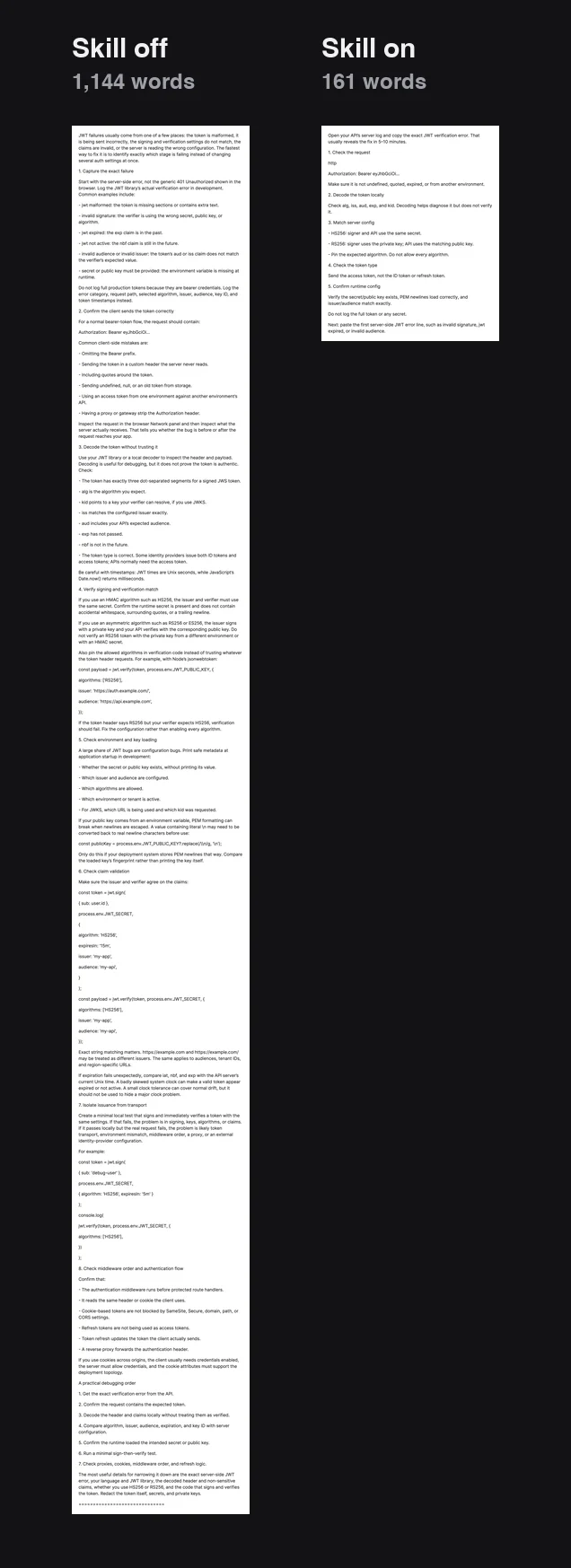
I asked the same question twice. With the skill off, the answer was 1,144 words. With it on: 161 words, starting with the one thing to do first.
hermes skills install ayghri/i-have-adhd/skills/i-have-adhdThen type /i-have-adhd. Or paste the repo's own install prompt:
Install the i-have-adhd skill/plugin from https://github.com/ayghri/i-have-adhd, refer to the repo's AGENTS.md for instructions.The question I tested with:
My JWT auth keeps failing in my app, how do I fix it?2. Planning With Files: it finishes what you start
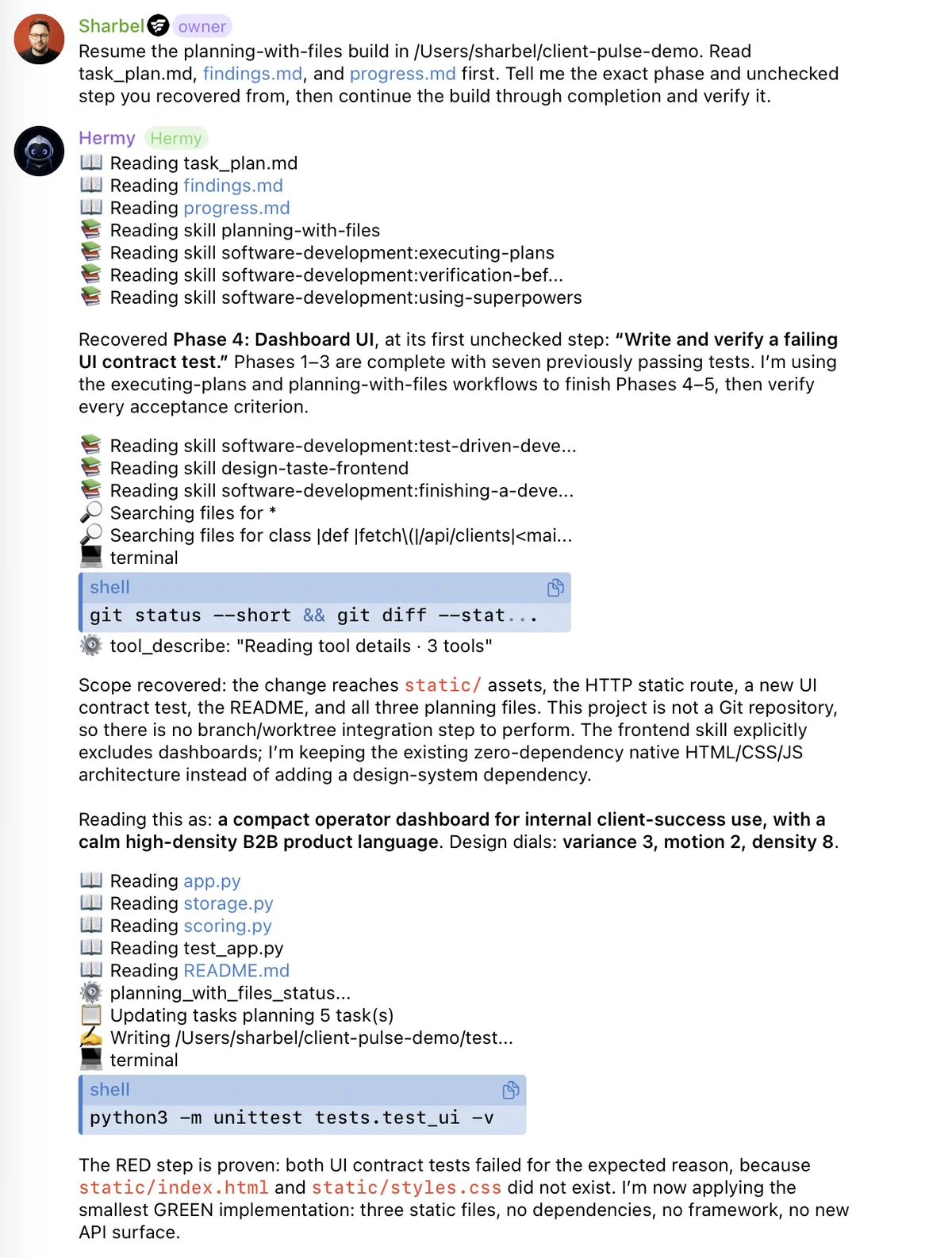
On a long job your agent forgets. You tell it something at the start, and 40 messages later it has wandered off and you're repeating yourself. Planning With Files pulls the plan out of the chat and into real files on disk (task_plan.md, findings.md, progress.md) and puts them back in front of your agent on every turn. Even after a crash or a cleared chat, the plan survives. It's a native Hermes plugin.
I gave it a long, multi-step build and let it get a few phases in. Then I cleared the chat, the thing that normally wipes an agent's memory. It read its own files back and picked up on the exact step it left off.
Run these in order. Use the .hermes path, not skills/planning-with-files: Hermes' scanner flags the generic skill, while the Hermes bundle scans safe.
hermes skills install OthmanAdi/planning-with-files/.hermes/skills/planning-with-files --yes
hermes plugins install OthmanAdi/planning-with-files/.hermes/plugins/planning-with-files
hermes plugins enable planning-with-files
Restart Hermes, then run /pwf to confirm it's live. The prompt I used after clearing the chat:
Resume the planning-with-files build in [your project folder]. Read
task_plan.md, findings.md and progress.md first. Tell me the exact phase and
unchecked step you recovered from, then continue the build through completion
and verify it.1. Ponytail: write less code
This is the one I install on any fresh agent before anything else. Your agent loves to over-engineer. You ask for one small thing and it writes three new files, a new config and a helper you never asked for: more code that breaks.
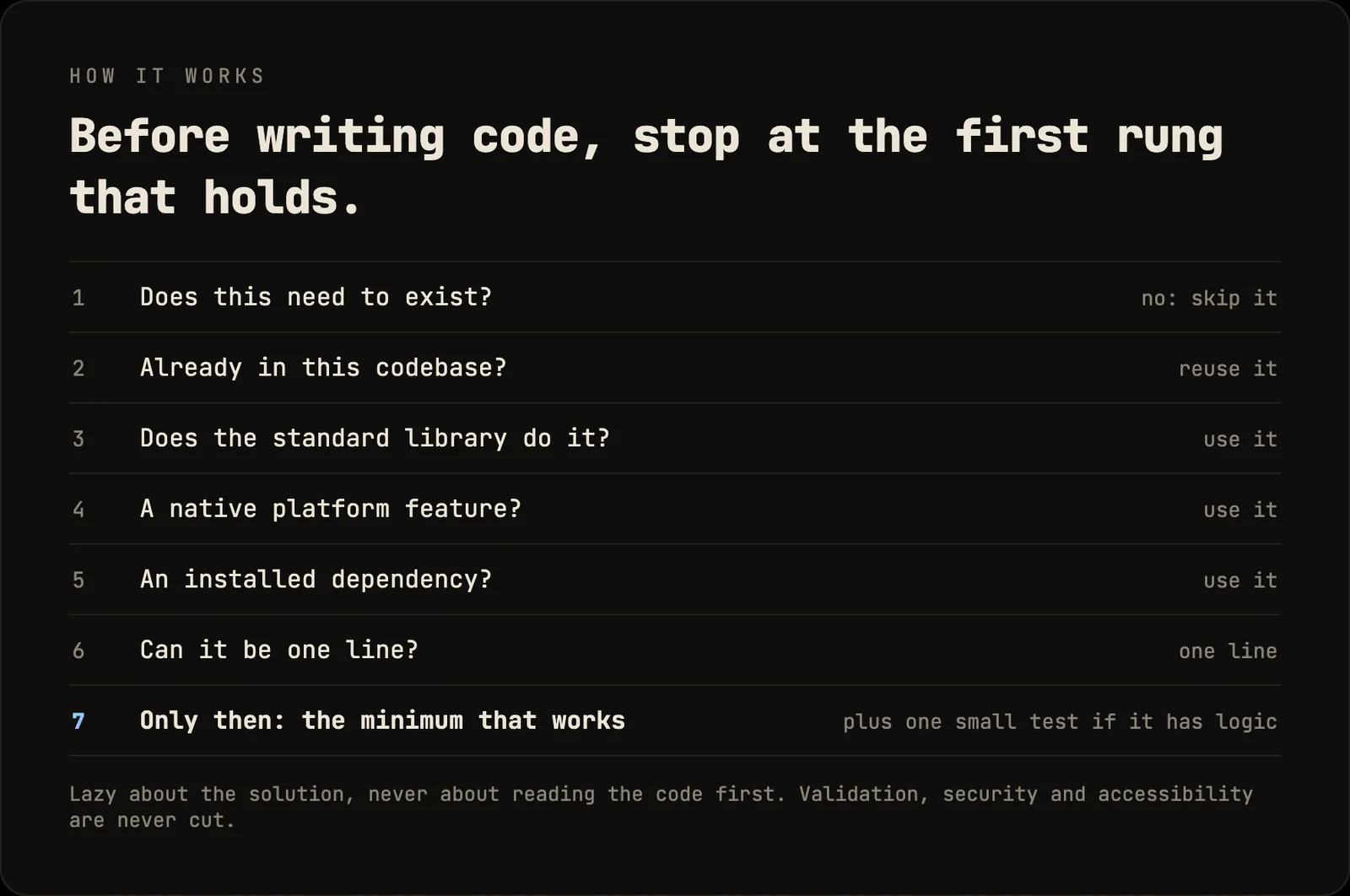
Ponytail (yes, that's the name) makes it think like the laziest senior developer alive. Before it writes a single line, it climbs a ladder. Does this code need to exist? Is it already in the codebase? Does the standard library or the platform already do it? Only when every answer is no does it write something new. And it names Hermes as a supported agent right in the repo.
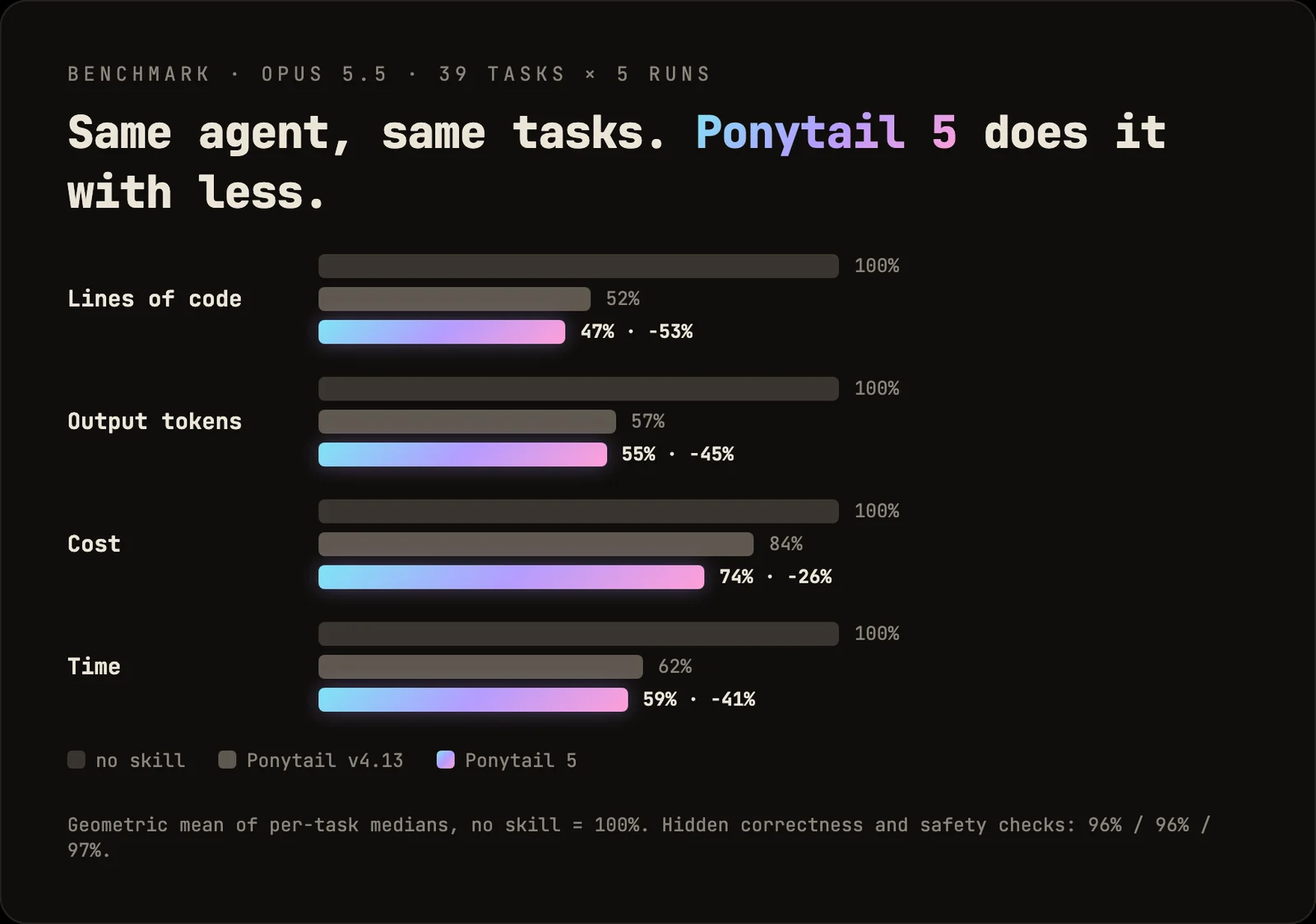
The repo's own example is the one I'd use to test it: a date picker. Without Ponytail, the agent built a calendar by hand in 335 lines. With it, one 10-line file reused the project's existing Input with type="date" and let the browser bring the calendar. Across the repo's benchmark of 39 tasks, that came out to 53% less code, 41% less time and 45% fewer tokens.
hermes plugins install DietrichGebert/ponytail --enableIf that stops with an "unsupported or missing Agent Plugins schema" error, use the repo's documented fallback:
git clone https://github.com/DietrichGebert/ponytail.git ~/.hermes/plugins/ponytail
hermes plugins enable ponytail
Restart Hermes. Then try it on a real request, and run /ponytail-review on the diff:
Add a date picker to the booking form.Honorable mention: Hermes Agent Mission Control
One I run that didn't quite make the cut, because it's my own: Hermes Agent Mission Control. It's how I run and keep an eye on all my agents from one place, and it's a good base if you want to build a custom mission control for your own Hermes.
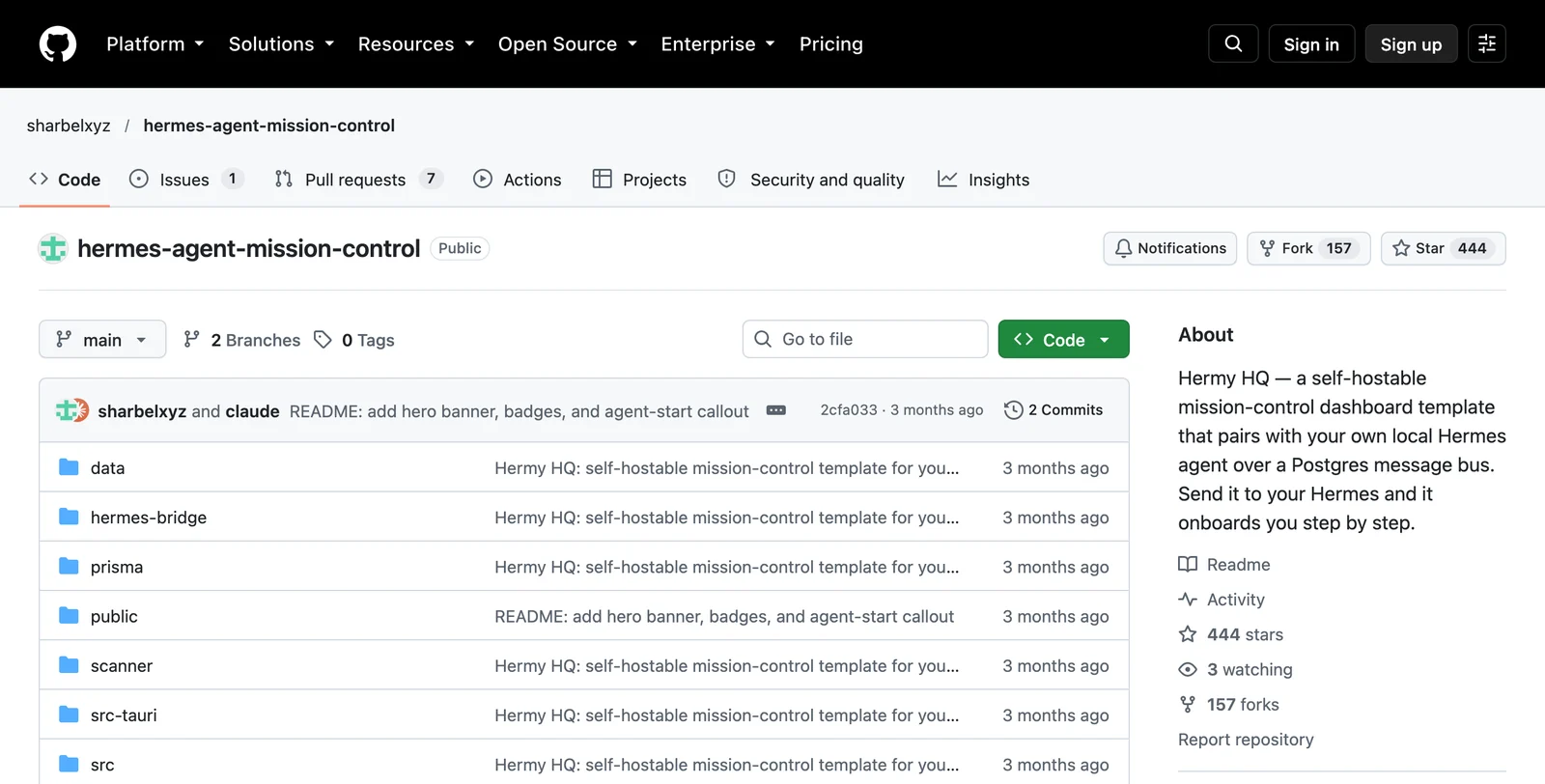
There's no single command. Clone it, then paste the contents of its ONBOARDING.md to your Hermes in that folder. It walks you through every step and pauses for each secret. You'll need Node 20+, a Postgres URL, Google OAuth credentials and a Vercel account.
Install all 10 in one go
This page is the "first link in the description" from the video. Easiest route: hand it to Hermes.
Install all 10 skills from this page, in order, using the Hermes-specific
command for each one. Stop and tell me if any step fails or needs a key:
https://sharbel.com/articles/best-hermes-agent-skills
Or run them yourself. Gbrain and Agent Reach need extra setup, so they're above in their own sections.
npx skills add cathrynlavery/diagram-design -a hermes-agent -g
npx skills add mukul975/Anthropic-Cybersecurity-Skills -a hermes-agent -g
npx skills add https://github.com/Leonxlnx/taste-skill --skill "design-taste-frontend" -a hermes-agent -g
npx skills add heygen-com/hyperframes -a hermes-agent -g
hermes skills install ayghri/i-have-adhd/skills/i-have-adhd
hermes skills install OthmanAdi/planning-with-files/.hermes/skills/planning-with-files --yes
hermes plugins install OthmanAdi/planning-with-files/.hermes/plugins/planning-with-files
hermes plugins enable planning-with-files
hermes plugins install DietrichGebert/ponytail --enable
Scientific Agent Skills is already a default tap on current Hermes: hermes skills search finds it.
Which one should you install first?
Start with the bottom three of the countdown. Ponytail, Planning With Files and I Have ADHD are free, need no API key, and change every single task you run. Add the rest as you hit the problem each one solves: Agent Reach when you need the gated web, Gbrain once you're tired of re-explaining yourself, Hyperframes the first time you need a video.
Then tell me in the comments of the video which one you installed first.
Further reading
Questions
- How do I install a skill in Hermes Agent?
- Use `hermes skills install owner/repo/path` to install a skill straight from GitHub; Hermes scans it and saves it to ~/.hermes/skills. For repos that only document the skills CLI, run `npx skills add owner/repo -a hermes-agent -g`. Restart Hermes or start a new session afterwards.
- What is the best Hermes Agent skill?
- Ponytail is the one I install first on any fresh agent. It makes the agent check whether code needs to exist before writing it, and the repo's benchmark shows 53% less code and 45% fewer tokens across 39 tasks.
- Are Hermes Agent skills free?
- All ten skills in this list are free and open source. A few need extra pieces to do their job: Agent Reach needs a logged-in session for some platforms such as X, and some Scientific Agent Skills need their own dependencies or API keys.
- Is the Anthropic Cybersecurity Skills pack official?
- No. It is a community pack that uses Anthropic in its name. It is not made or endorsed by Anthropic. Only point it at systems you own, such as a local OWASP Juice Shop.
- Why does Planning With Files use a .hermes path?
- The repo's Hermes guide says to install the bundle under .hermes/skills and .hermes/plugins because Hermes' security scanner flags the generic skill as dangerous, while the Hermes bundle scans safe.

You made it to the end
That is the whole build. Want the next one?
Read next

How to Build an Agent Skill That Actually Fires
I measured the 55 most popular skills on GitHub. Half of them never tell your agent when to run, and they charge you tokens on every message anyway.

Hermes Agent: 7 Real Jobs It Runs, With the Prompts
The seven jobs I hand Nous Research's free, open-source agent, and the exact prompt to copy for each one.

Hermes Agent Guide: 7 Setup Mistakes and the Exact Fixes
Memory that sticks, cheaper replies, skills, quiet cron jobs, /goal gates, subagents and a lighter context, with every prompt ready to paste.